
What Is Podcast Editing and How It Makes Shows Shine
 September 17, 202623 Minutes
Podcast editing is the multi-stage process of shaping raw recordings into a polished, platform-ready episode through cleanup, pacing, mixing, and mastering. In practice, it can also turn one recording into an audio episode, video episode, reels, and shorts.
You've finished recording. The conversation felt natural, your guest shared a sharp insight, and you can already see the episode supporting your brand. Then you press play and hear the long pauses, the repeated answer, the air conditioner in the background, and a volume jump every time your guest leans toward the microphone.
That moment is where podcast editing earns its place.
At Flexwork Podcast Studios in Springfield, NJ, editing is part of the bridge between a strong idea and a professional audience experience. This guide explains what podcast editing includes, how the stages fit together, which tools support the work, and how modern editors prepare content for audio, video, reels, and shorts. You'll also learn how to decide between a light touch, a detailed edit, and professional production support.
A practical starting point is Flexwork's guide to podcast post-production best practices, especially if you're building a repeatable release process rather than polishing one episode in isolation.
Introduction Why Great Editing Makes or Breaks Your Podcast
Raw audio rarely sounds like the finished shows you admire. A first-time host may record a thoughtful interview in a home office, only to discover that the guest talks over them, the opening takes too long, and a small room makes every voice feel distant. None of those problems means the conversation failed. They mean the recording still needs shaping.
Editing gives the episode structure. It removes distractions, protects the strongest moments, and helps the listener follow the conversation without making them work to stay engaged. For a business owner or creative professional, that consistency matters because every episode represents your thinking, your offer, and your standard of communication.
Podcast production has also become a serious weekly workflow. A 2026 creator survey found that 68% of podcasters use a digital audio workstation for editing, with Audacity and Adobe Audition identified as the most popular tools. The survey also found that podcasters spend an average of 12 hours per week on production tasks, including editing, uploading, and recording. You can review those findings in the podcast editor industry survey.
The difference between recording and releasing
Recording captures possibility. Editing turns that possibility into a clear listening experience.
A polished episode might include:
- A focused opening: The listener understands the subject and reason to keep listening.
- A cleaner conversation: Filler words, repeated lines, distracting pauses, and technical defects no longer interrupt the ideas.
- Consistent sound: Hosts and guests sit at a comfortable level rather than competing for attention.
- A usable final file: The episode is checked, exported, and ready for distribution.
- Repurposing potential: Strong moments can become visual clips, reels, shorts, captions, and website content.
Why DIY burnout happens
The first few edits can feel manageable. Then you start balancing multiple tracks, renaming files, reviewing guest notes, exporting drafts, and correcting the same issue across several versions. The creative energy that made you want to host the show gets spent on repetitive production work.
Professional editing doesn't remove your voice. It protects the time you need to develop the next idea, prepare for the next guest, and build relationships around the show. The result should still sound like you, only more intentional.
What Podcast Editing Really Means Beyond Cutting Mistakes
The simplest answer to what is podcast editing is that it's the process of improving a recorded conversation before publication. The complete answer is broader. Editing shapes pacing, audio quality, structure, file delivery, and content packaging.
Think of a podcast like a short film. Recording gives you the footage. Editing decides which moments belong together, where the story should breathe, and when the audience needs a change of pace. An editor isn't only deleting mistakes. They're guiding attention.

Four jobs inside one creative process
Recording is capture. It happens when you and your guest create the source material.
Editing is selection and structure. You remove material that weakens the flow, arrange sections, and preserve the strongest narrative.
Mixing is balance. You adjust voices, music, and supporting sounds so the elements work together instead of competing.
Mastering is final preparation. You apply loudness control, check the finished file, and export it in a format suitable for publication.
These stages overlap in conversation, but keeping their purposes separate helps you avoid confusion. A host may say an episode “needs better sound” when the issue is a meandering opening. More noise reduction won't solve a structural problem.
Why DAWs matter
A digital audio workstation, or DAW, gives an editor a visual and organized environment for handling recorded tracks. Instead of making destructive cuts to a single file, the editor can work with separate voices, music, transitions, and alternate takes. That makes revisions easier and supports more deliberate decisions.
The survey cited earlier reflects this professional shift. DAW-based editing has become a measurable part of podcast production, not an informal task completed after recording. Editors need software familiarity, file management habits, and an understanding of how the same source material may be prepared for different destinations.
Practical rule: Treat the recording as raw material, not as a finished episode.
That mindset changes how you listen. You begin looking for the clearest opening, the most useful answer, the natural pause that adds emotion, and the section that deserves a short-form cut. A finished podcast should feel effortless to the audience because the production choices have removed unnecessary friction.
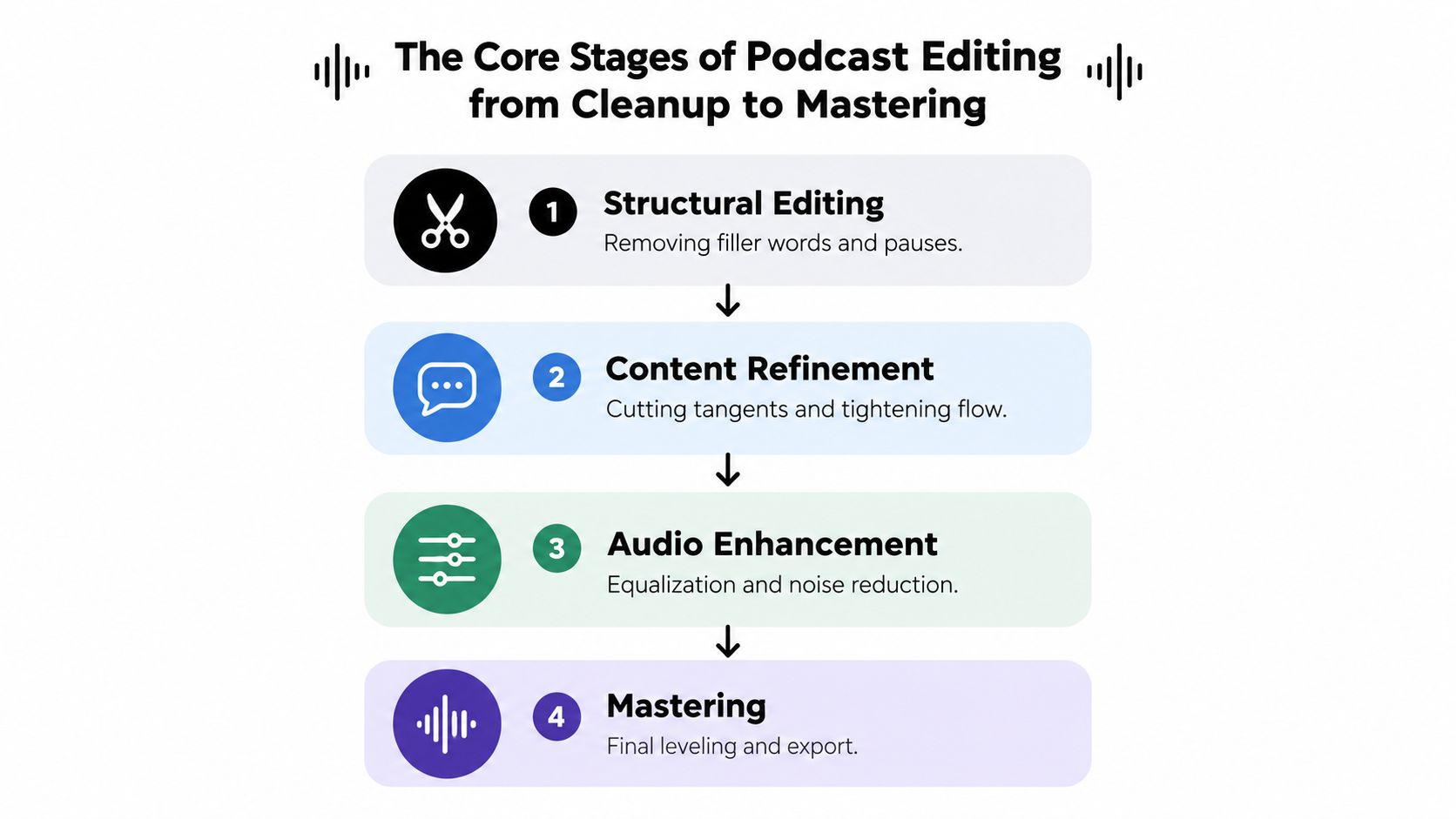
The Core Stages of Podcast Editing From Cleanup to Mastering
Editors generally work from content decisions to technical polish. That order protects your time. If you apply detailed processing before deciding what stays in the episode, you may have to repeat the work after cutting or rearranging sections.
Podcast editing commonly includes structural editing, noise repair, and loudness normalization. Editors first remove filler words, long pauses, repeated sentences, and off-topic tangents. They then address hum, clicks, plosives, and room echo. Once the content is locked, they apply compression, EQ, and final loudness control, as explained in this podcast audio editing basics guide.
Start with the conversation
Structural editing is where the episode becomes coherent. The editor listens for the promise of the show and removes sections that dilute it. That may include a long warm-up, an answer repeated in different words, a tangent that belongs in another episode, or a pause that breaks momentum without adding feeling.
Content refinement is more nuanced than deleting every hesitation. A brief pause can make a thoughtful answer feel human. A breath before a difficult statement can carry meaning. The editor's job is to distinguish distracting silence from expressive space.
Repair the recording
Once the structure is stable, the editor addresses defects. Common problems include low background hum, mouth clicks, harsh plosive sounds, uneven room tone, and echo. Each repair should be restrained. Heavy processing can make a voice sound unnatural, so the goal is clarity that still feels like a person speaking.
Music and transitions also belong after the main conversation has shape. Intro music should establish the show without delaying the substance. Sponsor sections and outros need clean entrances and exits, with levels that don't overwhelm the dialogue.
The linked Flexwork resource on how to edit podcast audio can help you review these decisions in practical terms.
Finish with balance and control
Mixing brings the voices, music, and effects into a stable relationship. Compression can reduce large volume swings, while EQ can help speech feel clearer. Loudness normalization then prepares the complete episode for consistent playback.
Before export, listen for abrupt cuts, missing words, clicks, sudden level changes, and music that masks speech. A good edit isn't defined by how much it removes. It's defined by whether the listener can stay focused on the story.
Essential Tools and Software That Power Professional Edits
The right editing tool depends on the show, the team, and the kind of output you need. A solo host making simple cuts has different requirements from a producer managing separate guest tracks, music, video, captions, and short-form exports.
A DAW offers detailed control. Audacity and Adobe Audition are both identified as popular editing tools in the creator survey cited earlier, but they serve different working styles. Audacity is approachable for straightforward audio edits, while Adobe Audition is suited to editors who want a deeper set of professional controls. You don't need to master every feature on day one. You need a workflow that lets you hear problems, make clean decisions, and return to the project without losing track of files.

Match the tool to the task
DAWs are the main workspace for cutting, cleaning, mixing, and exporting audio. They're a strong choice when you need track-level control or a repeatable production template.
Remote recording platforms help distributed hosts and guests capture sessions from different locations. The quality of the source files still matters, but remote tools can simplify capture and handoff.
AI-assisted tools can help identify filler words, long silences, and initial cuts. They can save review time, but they don't understand your brand, your relationship with a guest, or the emotional reason a pause may belong in the episode.
Video editors become essential when the show includes a camera angle, visual cutaways, captions, branded motion, or vertical clips. Audio and video versions need to feel connected, but they don't always need identical cuts.
Build a calm file workflow
Name tracks clearly. Keep raw recordings separate from working sessions and final exports. Save music, logos, captions, and sponsor assets in predictable folders. These habits sound simple, but they reduce confusion when a client, guest, producer, or editor requests a revision.
If you're starting with free software, Flexwork's guide to free podcast editing software offers a useful place to compare beginner-friendly options. For creators who want to stay focused on interviews and publishing rather than software setup, Flexwork Podcast Studios provides podcast production support that includes editing and mixing.
The best tool is the one that supports consistent decisions, clean handoffs, and reliable publishing.
Modern Podcast Editing for Video Reels and Multi Platform Growth
Podcast editing used to be described mainly as polishing an audio file. That definition no longer captures the full opportunity. U.S. podcast consumption is at record highs, with 73% of Americans aged 12 and older having ever consumed a podcast and 55% consuming monthly, while 51% have watched a podcast, according to Podcast Consumer 2025 research from SSRS.
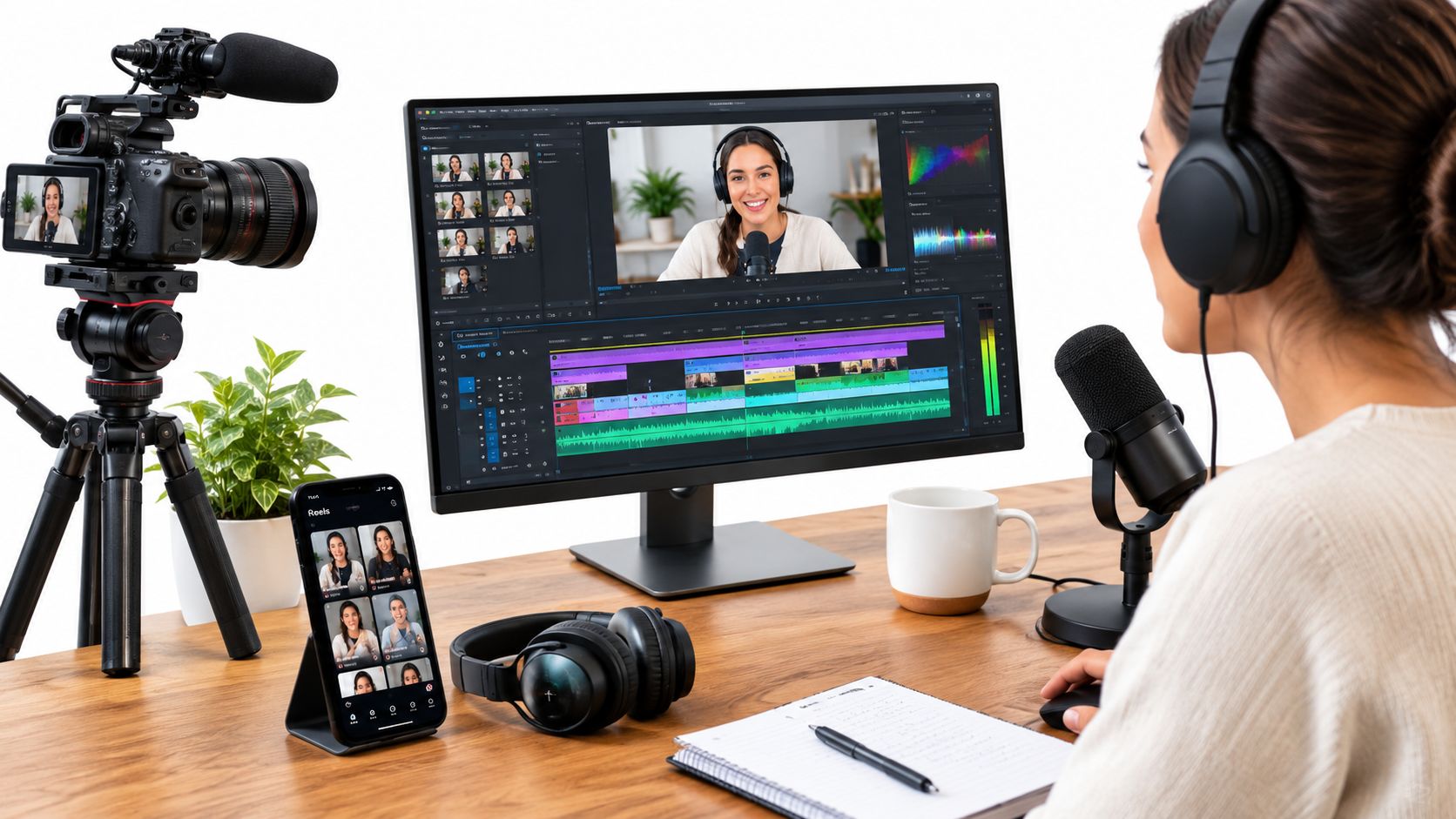
Those viewing habits change the edit. One recording may need to become a full audio episode, a watchable video episode, a series of vertical clips, subtitle-ready exports, and supporting website content. Each version has a different rhythm and frame, even when the central idea stays the same.
Edit for the screen, not just the feed
An audio listener can follow a thoughtful answer with their eyes closed. A video viewer needs a stronger visual entry point. Editors may use a tighter opening, camera changes, on-screen text, guest reactions, or a cutaway to maintain visual energy without making the conversation feel frantic.
Short-form editing requires another layer of judgment. A strong clip needs a complete idea, a clear setup, and a satisfying payoff within a compact viewing experience. It should make sense with captions and without relying on the full episode for context.
A practical repurposing reference is Donivo's repurposing workflow, which can help you think about turning one source recording into a coordinated set of social assets rather than treating every platform as a separate production.
Plan the recording for repurposing
You can make cross-format editing easier before you press record:
- State the central idea clearly: Strong answers are easier to isolate when the guest responds to a focused question.
- Leave visual room: A clean frame gives editors space for captions, titles, and vertical crops.
- Capture supporting moments: Reactions, introductions, product details, and transitions can add variety to short clips.
- Protect audio quality: Video can attract attention, but distracting sound can lose it.
- Mark standout moments: Note timestamps during or after recording so the editor can review promising clips quickly.
A Content Day at Flexwork can support this kind of planned output. The service is priced at $3000 per day and includes 20 edited reels or 60 professional photos, according to the stated service details. For creators focused on vertical distribution, Flexwork's resource on podcast clips for TikTok offers another practical angle on packaging ideas for short-form viewing.
How Much Editing Is Enough and When to Get Pro Help
Editing quality isn't measured by how aggressively you cut. It's measured by whether the finished episode sounds intentional while preserving the host's personality. A conversational business show may benefit from removing distractions and technical defects while leaving in natural laughter, a thoughtful pause, or a slight stumble that makes the exchange feel trustworthy.
Over-editing creates its own problem. If every breath disappears and every sentence becomes perfectly compressed, the audience may sense that the conversation has been flattened. Minimal editing can be the right choice for a personal interview, an intimate founder story, or a show whose appeal depends on spontaneity. More intensive editing makes sense when the format depends on a tight narrative, multiple speakers, music cues, or video cutdowns.
The financial decision also has a clear benchmark. A 2024 industry survey of podcast editors reported an average charge of $199 USD for an hour-long episode, as detailed in this podcast production industry survey. That figure doesn't determine what every project should cost, but it shows that editing is an established paid service with specialized labor behind it.
Choosing Your Editing Path
| Editing Option | Best For | Time and Cost Signal | Flexwork Fit |
|---|---|---|---|
| DIY light edit | Hosts with a simple format and time to learn | Lower direct spend, higher personal workload | Hourly studio rental plus a self-managed workflow |
| DIY detailed edit | Creators who enjoy production and need hands-on control | More review, cleanup, mixing, and export responsibility | Useful when you want to record professionally and edit independently |
| Be My Podcast Producer | Hosts who want ongoing production guidance | Supports a more structured release process | A fit for production planning and episode support |
| Market, Manage & Produce My Podcast | Brands pursuing consistent publishing and audience development | Starts at $1500 per episode with a 20-episode growth commitment | Built for a larger production and growth plan |
| Content Day | Creators who want a planned batch of visual assets | $3000 per day, including 20 edited reels or 60 professional photos | Supports video-first repurposing |
| Podcast website | Shows that need a dedicated home for episodes and brand content | $5000 plus hosting | Connects publishing, discovery, and owned content |
Use this decision test
Choose light editing when the conversation itself is the product and small imperfections support the format. Choose professional help when editing keeps delaying releases, when guest audio varies, or when every episode needs video and short-form versions.
For a closer look at available support, review Flexwork's podcast editing services. The right arrangement should give you a clear approval process, consistent standards, and enough flexibility to protect the voice of the show.
Your Next Episode Polished Ready to Publish and Built to Grow
Podcast editing is storytelling craft with a technical finish. It shapes the opening, protects the strongest ideas, controls distractions, and prepares the episode for the places your audience watches and listens. The most effective edit isn't necessarily the most aggressive one. It's the edit that improves clarity without erasing personality.
Before you publish, review this compact quality checklist:
- Content: Confirm the episode has a clear opening, focused structure, and clean ending.
- Dialogue: Check for distracting filler, repeated ideas, clicks, hum, echo, and abrupt cuts.
- Balance: Listen for consistent levels between speakers, music, and transitions.
- Loudness: A practical target is about -16 LUFS integrated for stereo, with a true-peak ceiling around -1 dBTP. Mono is commonly targeted around -19 LUFS, according to this podcast loudness standard guide.
- Export: Podcast guidance commonly recommends MP3 at 64–128 kbps for mono voice-only shows and 128–256 kbps for stereo or music-bed shows, using a 44.1 or 48 kHz sample rate, as outlined in this podcast export quality checklist.
- Review: Play the final file from start to finish before uploading it.
Flexwork's premium production approach connects recording, editing, video, repurposing, branding, and publishing support in one workflow. You can start with an hourly studio rental, explore the production package breakdowns, or use the contact and booking page to plan your next recording.
Book a session with Flexwork Podcast Studios to record in a professional audio and video environment, shape your raw material into polished episodes, and create reels or shorts from the same production day. Explore the available packages or schedule a studio visit so your next episode is built for confident publishing from the start.