
Master Video Podcast Editing: Pro Workflow 2026
 May 30, 202626 Minutes
Meta description: Video podcast editing shapes how your show feels, performs, and grows. Learn a pro workflow and when to DIY or delegate.
URL slug: /video-podcast-editing-workflow
Primary keyword: video podcast editing
Secondary keywords: podcast video editor, video podcast production, repurpose podcast clips
The recording is over. The guest was sharp, your points landed, and the conversation had the kind of energy you know can build a real audience. Then you open the project folder and the mood changes. Camera files. Separate audio. Pickup lines. False starts. Long pauses that felt natural in the room but now drag on screen.
This is where strong shows either become polished brands or stay stuck in raw-footage limbo.
Great video podcast editing isn't about fancy transitions or overworked effects. It's about protecting the best parts of the conversation and shaping them into something people want to keep watching, share, and remember. That final cut carries your pacing, your credibility, and your visual identity. If you want your show to feel bigger than “another filmed interview,” the edit is where that happens.
Your Podcast Looks Good, But It Could Be Unforgettable
A lot of creators hit the same wall. They've done the hard part already. They booked the guest, showed up prepared, and recorded a conversation with real substance. On set, it felt premium. In the timeline, it suddenly feels unfinished.
That gap is normal.
Raw footage almost never reflects the actual quality of the episode. It reflects process. The editor's job is to reveal the story hiding inside the process. That means stripping away friction, finding the cleanest emotional arc, and making the episode feel intentional from the first frame to the final callout.
The audience doesn't experience your recording session. They experience your edit.
That distinction matters. A smart edit can make a one-camera setup feel deliberate. A careless edit can make an expensive studio session feel flat. The difference usually comes down to pacing, shot choice, sound cleanup, and whether every decision supports the host's brand instead of distracting from it.
If you're staring at your files and wondering where to start, start with this mindset. Editing isn't the administrative chore after production. It's the final stage of storytelling.
Why Professional Video Is No Longer Optional
If you still think of video as a nice extra for your podcast, you're operating with an old model. The serious creators have moved on.
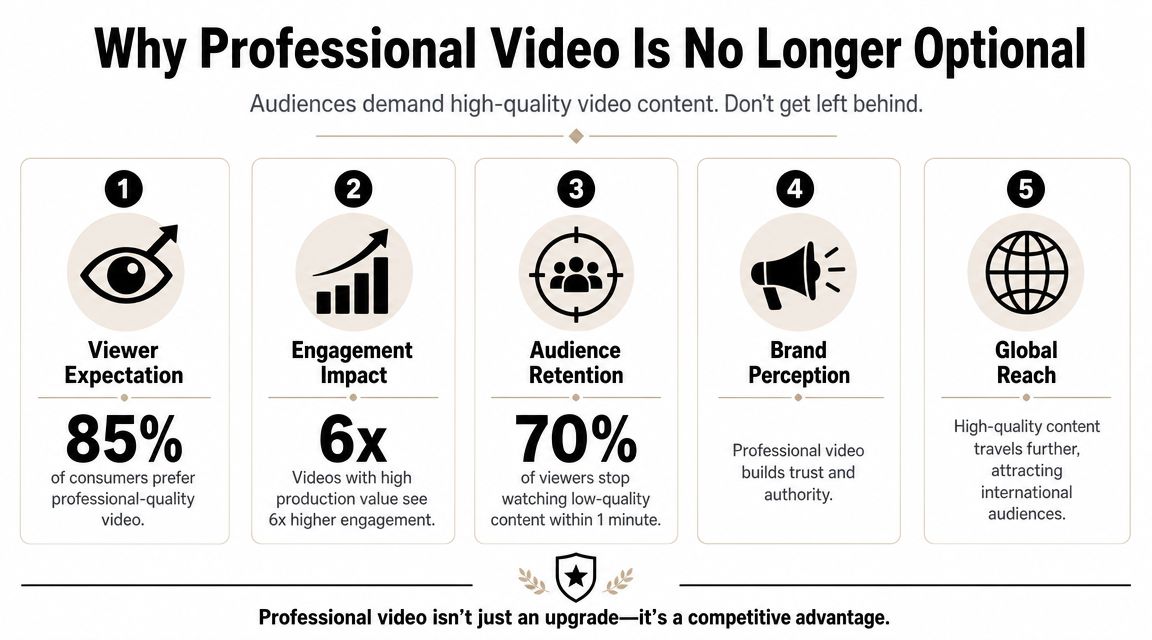
According to Sweet Fish Media's 2025 video podcast findings, only 17% of current podcasters record video, yet 61% of the Top 150 podcasts in the study post video regularly. The same report says the number of video podcasts in the top 30 podcast charts has doubled year-over-year since 2022. That tells you something important. Video isn't evenly adopted, but the shows that rise are increasingly treating it like core infrastructure.
The bar has changed
Viewers compare your episode to everything else in their feed. They're not grading on effort. They're reacting to whether the show feels clear, watchable, and worth their time.
That doesn't mean every podcast needs a glossy, cinematic finish. It means every serious show needs editorial control. Clean framing. Consistent sound. Deliberate cuts. Graphics that look like they belong to a brand, not a template pack. If you skip those details, the audience feels the drop in quality before they can describe it.
A lot of DIY burnout comes from misunderstanding the problem. The issue usually isn't “I need better software.” It's “I'm asking one person to be host, producer, editor, clip strategist, distributor, and marketer.” That's how good shows become inconsistent shows.
Video changes what one recording can do
A recorded episode is no longer just a long-form asset. It's the source file for YouTube, site embeds, vertical clips, social teasers, guest snippets, and sales content. That's why the shooting and editing process has to anticipate multiple destinations.
If your setup is still designed for audio first and video second, it's worth looking at a dedicated video podcast studio environment where recording angles, lighting, and post-production needs are planned from the start. Better inputs don't replace editing, but they give the edit more room to work.
Practical rule: A premium-looking podcast isn't built by adding polish at the end. It's built by recording with the edit in mind.
What this shift means for your brand
Professional video does three things at once:
- It signals seriousness: Clean editing tells guests, sponsors, and viewers that your show is managed with intent.
- It reduces friction: Better pacing and better sound make it easier to stay with the conversation.
- It increases output value: One episode can support a wider content system when the footage is cut strategically.
That last point matters most for growing brands. The winners aren't just recording conversations. They're packaging them well enough to travel.
The Professional Video Podcast Editing Workflow
Professional video podcast editing gets easier when the order is right. A lot of wasted time comes from polishing too early, fixing the wrong problem, or adding visual flair before the story is stable.
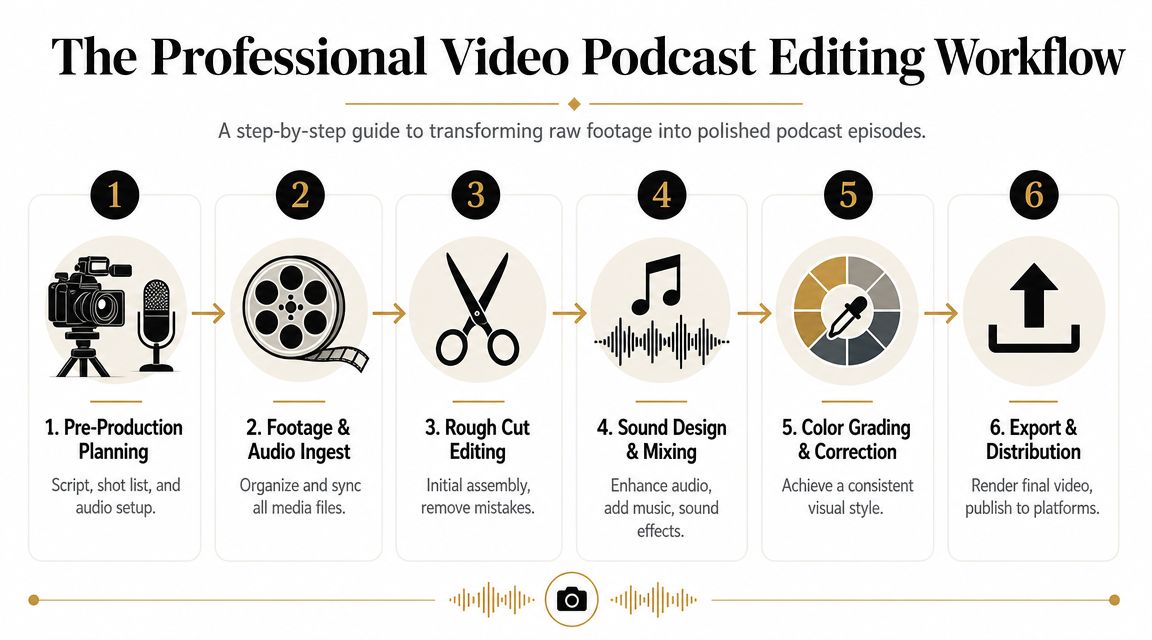
A practical sequence recommended by Podcast Monkey's video podcast editing workflow is to organize assets with a consistent naming scheme, build a rough cut to remove mistakes and tangents, tighten the fine cut with jump cuts, L-cuts, and J-cuts, and then apply audio cleanup, color correction, branded graphics, and platform-specific export settings. That order works because it reduces rework and protects narrative flow.
Start with the edit before you start cutting
Before you trim a single second, build a project that won't punish you later. That means folders that make sense at a glance, camera files labeled clearly, audio separated cleanly, and a timeline structure you can hand off if needed.
The creators who struggle most usually skip this step because it feels uncreative. Then they spend the rest of the day hunting for the right take, relinking media, or fixing sync problems they should've solved at ingest.
A simple prep checklist helps:
- Name files with intent: Use episode number, date, camera angle, and speaker identifiers.
- Sync first: Align external audio and camera feeds before making any story decisions.
- Create a working structure: Keep bins for raw footage, selects, graphics, music, exports, and social cutdowns.
- Use proxies if your machine drags: A smooth timeline leads to better editing choices because you can evaluate rhythm in real time.
If you're exploring faster systems, Aicut's AI video editing guide is a useful read for understanding where AI can speed up repetitive tasks without replacing editorial judgment.
The rough cut is where you protect the conversation
The rough cut isn't about making the episode polished. It's about making it coherent.
You remove false starts, dead space, repeated ideas, obvious tangents, and moments that weaken the core promise of the episode. Be ruthless, but not mechanical. If a pause adds emotion or a detour reveals character, keep it. If it only slows the viewer down, trim it.
A rough cut usually answers four questions:
| Question | Why it matters |
|---|---|
| What is the real point of this episode? | It keeps the edit from wandering |
| Which moments carry energy? | Those become anchors for pacing |
| Where does attention dip? | Those sections need tightening or reframing |
| What should be saved for clips? | It prevents overcutting the main episode |
A rough cut should feel slightly loose but clearly intentional. If it still feels shapeless, you haven't finished the story pass.
This is also the stage where many creators discover they recorded a good conversation, not yet a good episode. That's fine. Editing bridges that gap.
A more detailed breakdown of cleanup, sequencing, and polish lives in this guide to post-production best practices for podcast episodes.
Later in the workflow, it helps to see the process in motion:
The fine cut is where the show gets expensive-looking
This is the stage people notice without knowing why they notice it.
Fine cutting is where pacing becomes persuasive. You tighten answers without making them feel chopped. You switch angles to underline emphasis. You use an L-cut so the next speaker's audio starts before the camera changes, which makes the conversation feel more natural. You use a J-cut to carry one thought over visual movement and avoid that rigid, mechanical interview feel.
What usually works:
- Cut on intention: Switch when the speaker's emotion, point, or energy changes.
- Use reaction shots carefully: A guest listening can be more powerful than a host talking.
- Trim filler without flattening personality: Leave enough breath for the conversation to feel human.
- Keep effects minimal: Most podcasts look stronger with restraint than with constant movement.
What usually doesn't work:
- Cutting on every sentence: It makes the episode feel twitchy.
- Using zoom punches as a substitute for judgment: If every moment is “important,” none of them are.
- Adding graphics too early: Branding should support a strong edit, not rescue a weak one.
The best video podcast editing doesn't scream that it was edited well. It makes the viewer relax into the conversation.
Advanced Techniques for a Signature Look and Sound
Once the structure is solid, polish starts to matter more. Polish is what makes a competent episode distinctive. Most audiences won't name compression settings or color balance choices, but they will feel when a show sounds controlled and looks coherent.
Sound is the first trust signal
If the audio is harsh, hollow, noisy, or inconsistent between speakers, the edit feels amateur no matter how good the camera image is.
For most podcast episodes, the audio polish comes down to a few moves done well. Remove constant background noise without making voices sound brittle. Use EQ to reduce mud and improve clarity. Apply compression so one speaker doesn't disappear while the other clips. Then listen through transitions, because edits that look fine often click, pop, or change room tone in obvious ways.
A clean audio chain tells the audience your show is safe to stay with. They don't need to ride the volume or tolerate distractions.
Fixing audio isn't cosmetic. It's retention work.
Better color creates consistency, not drama
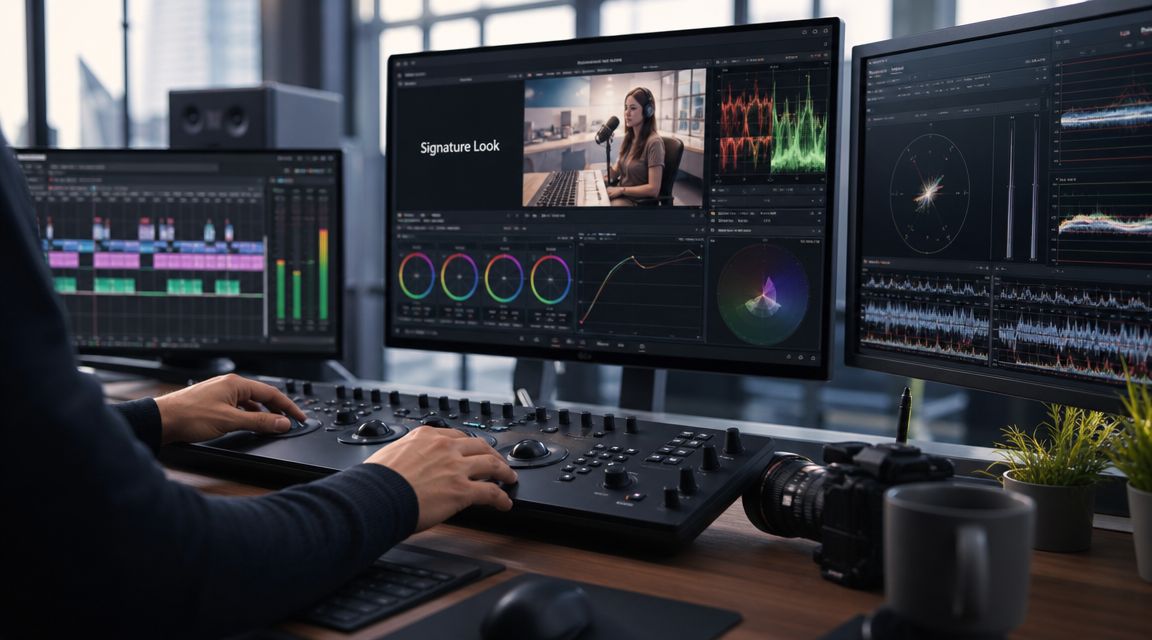
Many creators jump straight to “grading” when what they really need is correction. Correction is technical. It gets exposure, white balance, and camera matching under control. Grading is aesthetic. It shapes the final mood after the footage already matches.
If you use multiple cameras, consistency matters more than style. A warm host angle and a cool guest angle can make a simple conversation feel sloppy. Once the shots match, then you can decide whether your brand should feel clean and bright, soft and editorial, or darker and more cinematic.
According to B&H's guide for editing video podcasts, a common benchmark for multi-camera video podcasts is to record at least one medium or close-up angle per speaker and capture in 4K even if the final export is lower resolution, so editors can crop reframes without losing detail. The same guidance recommends syncing feeds in post, using keyboard shortcuts or live-switching to keep cuts efficient, and keeping effects minimal unless a dedicated motion-graphics workflow is available.
That advice is practical because it reflects a real editorial trade-off. More angles can create more control, but only if they improve clarity. More effects can create more motion, but not always more quality.
Motion graphics should guide, not decorate
Animated intros, lower thirds, title cards, chapter bumps, and end screens can add authority when they do a job. They can also date a show fast when they become overdesigned.
Use graphics for a reason:
- Lower thirds identify the guest and establish credibility.
- Intro sequences set tone and make the opening feel intentional.
- On-screen callouts help when the guest references a book, company, or concept.
- End screens create a clean next step for subscribers, viewers, or sponsors.
If your branding still feels pieced together, a useful next step is reviewing what strong creators consider in video editing software decisions, because the right toolset affects how efficiently you can maintain a consistent visual system.
One camera can still look polished
Not every show has a multi-camera budget. That doesn't automatically mean it has to look flat.
With a well-framed 4K shot, you can create virtual reframes in post that mimic wider and tighter coverage. This works best when the host and guest were positioned intentionally from the start. It works poorly when the frame is cramped, soft, or exposed inconsistently. The trick isn't pretending one camera is four. The trick is using crop-based variation sparingly enough that it feels designed.
A signature look usually comes from consistency, not complexity. Great shows repeat smart choices.
Repurpose Your Podcast for Maximum Reach
The full episode is not the finish line. It's the source material.
One of the most underanswered parts of video podcast editing is how to cut for short-form repurposing without making the main episode feel hacked apart. Recent workflows increasingly frame editing as repurposing, not just assembly, including AI multicam tools positioned to speed up clip creation, as discussed in this video conversation about editing for shorts and repurposing. That shift matters because the episode and the clips now need to work together.

Choose clip moments with a strategist's eye
Not every good moment is a good short.
A strong clip usually does one of three things quickly. It delivers a clean opinion. It creates tension or surprise. Or it offers a complete takeaway without needing too much setup. Long clips that depend on context can still work, but they need a stronger hook and cleaner framing.
The fastest way to weaken your repurposing is to pick moments based only on what sounded smart in the room. Short-form has different demands. The viewer is scrolling. The opening has to earn attention immediately.
Good clip candidates often include:
- A sharp claim: Something that makes the viewer agree, disagree, or stay.
- A memorable line: A phrase that feels quotable on first listen.
- A concise teaching moment: A usable insight that stands alone.
- A revealing reaction: A pause, laugh, or expression that gives the clip life.
Edit vertically without breaking the brand
Vertical video isn't just a crop. It's a different composition.
That means reframing faces higher, keeping captions readable, and cutting faster when the platform calls for it. It also means protecting brand quality. Bad vertical edits often feel disposable because they're treated like scraps from the main timeline. The stronger approach is to build them as native assets from the same recording.
If you want a broader framework for effective content repurposing, that guide is helpful because it treats a long-form asset as the center of a wider distribution system, not as a one-off post.
Edit the full episode for depth. Edit the short clip for interruption.
Turn one session into a content system
A single recording can support far more than YouTube.
Flexwork's Content Day format is built around that idea. Content Days are $3000/day and include 20 edited reels or 60 pro photos. For creators who batch intentionally, that kind of session can stock a month's worth of visual content from one strong shoot. The point isn't just volume. It's consistency.
If you want examples of how one episode can branch into multiple assets, this guide on repurposing a single podcast episode into 10 pieces of content is a practical next read.
A useful repurposing stack often looks like this:
| Asset | Best use |
|---|---|
| Full video episode | YouTube, website, sponsor inventory |
| Audio-only version | Podcast platforms |
| Vertical clips | Reels, Shorts, TikTok |
| Quote graphics | LinkedIn, Instagram, email |
| Written recap | Blog, newsletter, SEO support |
That's how editing stops being a post-production task and starts becoming distribution strategy.
Know When to DIY vs Delegate Your Edit
There's a point where editing your own show stops being a smart use of creative control and starts becoming a drag on growth. Most creators feel that point before they admit it. Episodes get recorded faster than they get released. Clips stay in drafts. Publishing slips because the edit keeps getting pushed to late nights.
That matters because editing choices affect performance. Zebracat's video podcast statistics report an average 62% viewer retention rate for video podcasts. The same source says episodes under 30 minutes average 54% retention, while episodes longer than 45 minutes average 68% retention. It also reports an average of 93 comments per video podcast and 188 comments for live-streamed episodes. Those numbers don't mean “longer is always better.” They do mean the editorial choices around pacing, structure, and live-to-post handling have real consequences.
DIY makes sense when the edit is still teaching you
Keep editing your own show if the process is sharpening your instincts. Early on, cutting your own material teaches you how you ramble, where your intros lag, and how your on-camera energy translates. That feedback loop is valuable.
DIY also makes sense when your release schedule is manageable and your visual system is simple. One camera. Minimal graphics. Straightforward interviews. Clean turnaround expectations.
Delegate when editing blocks the rest of the business
Hand it off when the bottleneck is obvious.
That usually looks like this:
- You're delaying releases: The content is recorded but not shipping.
- Your quality changes week to week: Different episodes feel like different brands.
- You need clips but never get to them: Long-form always wins and short-form disappears.
- You're spending your best hours in post: The edit is taking time from outreach, guest booking, sales, or strategy.
If audio cleanup is the piece dragging you down first, a dedicated podcast audio editing service can remove that friction without forcing a full production handoff.
For broader support, the decision becomes operational. Podcast websites are $5000 plus hosting, which matters when your show also needs a stronger home base. For creators focused on growth infrastructure, the Market & Manage tier starts at $1500 per episode with a 20-episode growth commitment. That kind of package makes sense when the podcast is no longer a side project and needs systems around distribution, promotion, and consistency.
Delegating isn't a creative surrender. It's often the move that lets the host act like the host again.
If your show is ready for sharper edits, cleaner delivery, and a more scalable production rhythm, Flexwork Podcast Studios is one place to start. Book a studio session, ask about production support, or explore which setup fits your next stage of growth.