
Podcast Motion Graphics That Actually Convert in 2026
 August 30, 202626 Minutes
You've published a strong episode, shared the cover art, and waited for the audience to respond. Instead, the feed stays quiet while shows with weaker conversations collect attention through polished clips, animated captions, and recognizable visual branding. The problem usually isn't the content. It's the missing distribution layer.
Podcast motion graphics turn spoken ideas into assets people can understand while scrolling, watching without sound, or deciding whether your show deserves their time. They can support YouTube discovery, short-form promotion, sponsor visibility, and a more consistent brand across every platform. Flexwork Studios treats that visual layer as part of production, not an afterthought, with studio sessions, editing, motion design, Content Day options, and growth-focused podcast packages built for creators who want their work to look as intentional as it sounds.
Why Your Podcast Looks Flat Without Motion Graphics
A creator can spend hours refining an interview, record clean audio, and publish a thoughtful episode, then reduce the entire launch to one static image. That post asks the audience to stop, read, trust the show, and click without giving the feed much movement or context. Meanwhile, a competing podcast can extract one sharp idea, add captions, animate the speaker's name, and make the same kind of insight feel native to YouTube Shorts, Reels, and TikTok.
The shift is visible across the podcast market. One 2026 industry roundup reports that about 50.6% of podcast shows now publish full video content on YouTube, compared with roughly 22% in 2022, which the source describes as a 130% increase over four years. The same roundup says YouTube leads with 39% of U.S. weekly podcast consumers, 41% of listeners prefer watchable content, and the number of video podcasts in the top 30 charts has doubled. The DINFOS Live motion graphics roundup connects that shift to branded lower-thirds, animated transitions, and clip packaging.
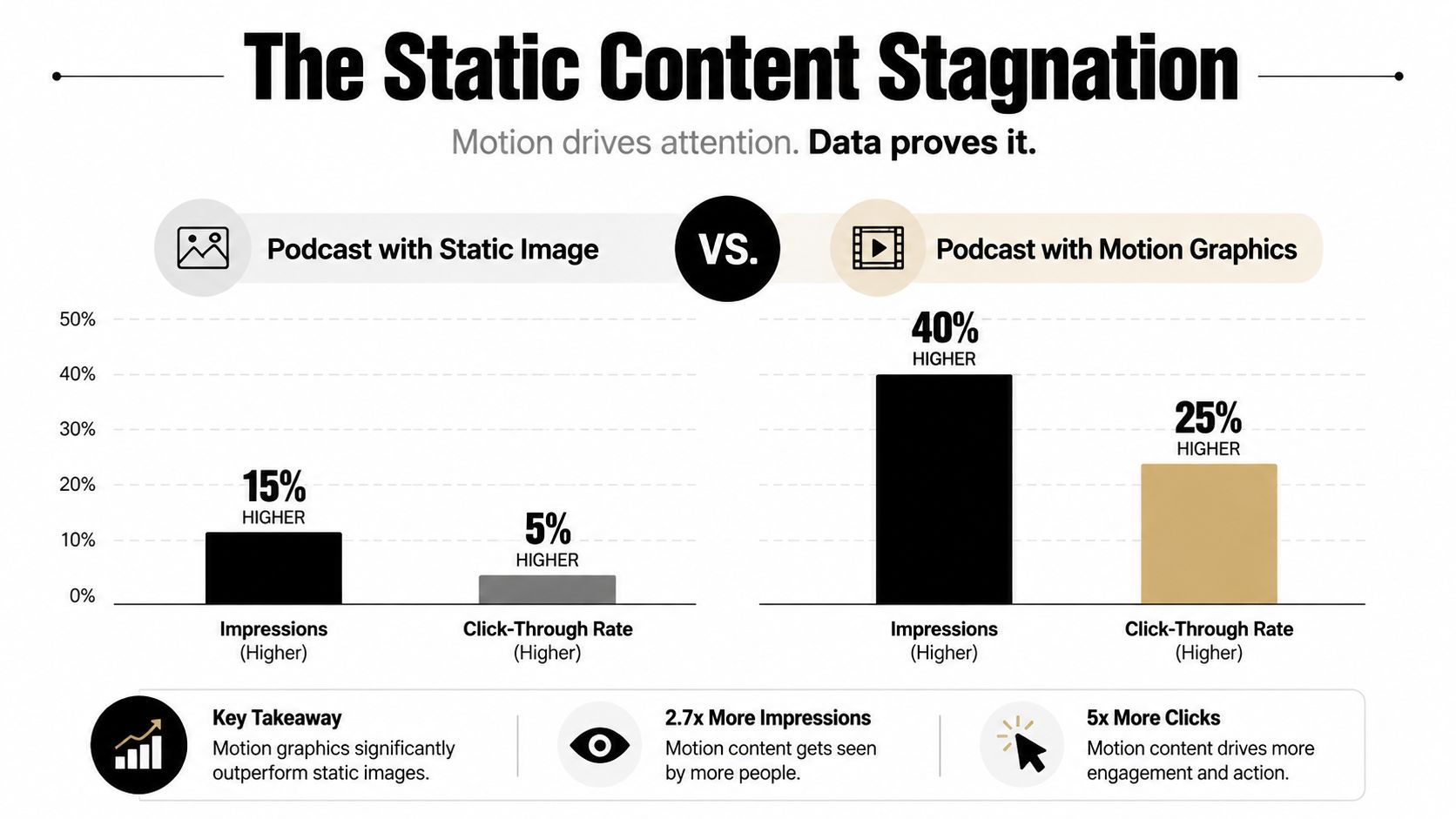
The supplied infographic illustrates the creative problem, but its example percentages should not be treated as verified performance benchmarks. You shouldn't promise a fixed lift from animation. You should build visuals that make the message easier to notice, understand, and share.
The distribution layer your episode is missing
Short-form video now carries a large share of social attention. A 2026 marketing statistics roundup reports that short-form videos generate 31.38% of total engagement, while interviews, podcasts, and expert talks account for 13.84%. Another 2026 source says podcast clips posted as Shorts, Reels, and TikTok increased by 77% in the past year, while videos under 90 seconds retain about 50% of viewers. Those figures make a practical point: a podcast needs visual packaging to compete in feeds built around fast comprehension. Reason FM's comparison of podcasts and short-form content provides that context.
Without motion design, you lose more than visual polish:
- Silent-feed clarity: Animated captions and text cues help communicate before a viewer turns sound on.
- Brand recognition: A consistent intro, type system, color palette, and lower-third style help viewers identify your show quickly.
- Sponsor evidence: A properly packaged clip gives prospective sponsors a clearer view of how your audience encounters the brand.
- Repurposing speed: A designed template makes it easier to turn one recording into a family of platform-native assets.
I recommend treating every episode as a source file for multiple experiences. The full conversation earns depth. Motion graphics help the strongest moments travel.
If your current cover art needs a visual system that can translate into intros, clips, and social templates, start with Flexwork's podcast cover art design service. The objective isn't to decorate the episode. It's to give every distribution asset a recognizable point of view.
What Podcast Motion Graphics Actually Are
Podcast motion graphics are animated visual elements built around podcast audio or video to improve recognition, storytelling, and engagement. They include far more than zooming into a speaker or adding a moving waveform. A strong system combines typography, timing, brand assets, captions, transitions, and editorial judgment.
Start with the assets that do useful work:
Brand and identity assets
An animated logo intro can establish the show at the beginning of a YouTube episode or a launch trailer. Keep it short enough to preserve momentum, and reuse the same visual language in the outro so the show feels consistent rather than rebranded every week. Animated covers can give a video-first episode a branded opening frame, while a restrained outro can direct viewers toward the next action.
A lower third identifies a guest or host during the first appearance. The practical editorial rule is to introduce the participant within the first 30 seconds of their appearance and hold the graphic for about 5 to 7 seconds, as recommended by FoxTalkX Studio's motion graphics guidance. Use the same treatment for credentials, companies, or episode themes when that information helps viewers follow the conversation.
Audio-led social assets
A waveform audiogram gives an audio excerpt a visual pulse for platforms where a static file would disappear in the feed. It works well for a memorable statement, a short announcement, or a teaser that needs to send viewers to the full episode.
Kinetic typography makes the words themselves the visual hook. Use it when the line carries the clip, such as a concise business principle or a strong guest opinion. Captions should remain legible, paced to speech, and designed for viewers who never enable audio.
Storytelling and launch assets
Illustrated loops can add personality to an audio-first series, especially when the show has a distinctive host character, recurring theme, or educational format. Promotional teasers can combine a headline, guest image, short quote, and release prompt for LinkedIn, Instagram, or YouTube.
The format should follow the message. Don't animate every word just because the software allows it.
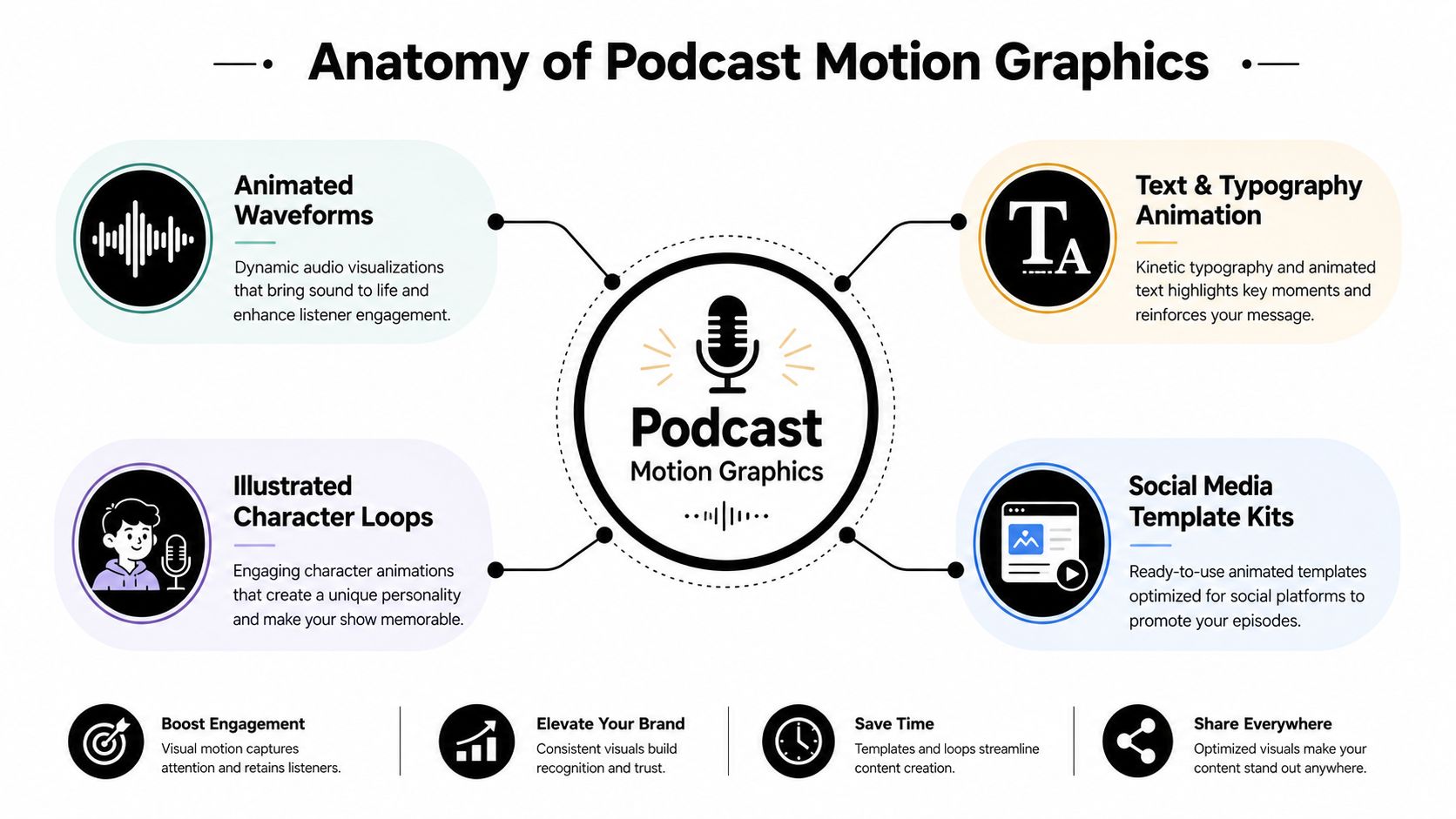
For a practical breakdown of design choices and production methods, use Flexwork's guide to creating motion graphics. The distinction matters: video editing controls the sequence of footage, while motion design creates visual meaning through movement. Cuts and zooms can improve pacing. Graphics can identify, emphasize, explain, and package the idea for a different platform.
The Motion Graphics Production Workflow From Brief to Export
Good animation starts before anyone opens After Effects. A producer needs to know what the episode must accomplish, where the content will appear, and which moments deserve visual emphasis. Without that direction, a designer can make attractive assets that don't support the show's actual distribution goals.
Start with the brief
The brief should capture:
- Episode objective: Decide whether the priority is awareness, subscriptions, qualified leads, a product conversation, or a sponsor deliverable.
- Platform plan: Identify whether the source material is headed to YouTube, Spotify Video, LinkedIn, Instagram, TikTok, or several destinations.
- Brand rules: Supply logo lockups, color tokens, fonts, existing templates, and examples of visuals that already feel right.
- Editorial moments: Mark the strongest hooks, useful explanations, emotional turns, and quotable lines before animation begins.
Asset preparation follows. The team organizes source audio, camera footage, logos, typography, music, sound effects, and reusable layouts. A reusable template protects consistency across episodes and reduces the temptation to reinvent the show's identity every time a guest appears.

Build the clip around one idea
A social clip should have a clear beginning, development, and payoff. Producers pull a line that can stand on its own, remove unnecessary setup, then pair the edit with captions, speaker framing, and graphics that reinforce the point. Clips can range from brief hooks to longer excerpts, but each needs a reason to keep watching.
The design stage turns that editorial decision into a storyboard or animatic. The team chooses when a name card enters, where a statistic or phrase appears, how the logo behaves, and which transitions support the rhythm. A systematic literature review found that high-contrast visuals, low-saturation tones, symbolic effects, and smooth transitions can improve visual appeal and information retention. The systematic review on motion design and retention supports a restrained approach, not a race toward maximum movement.
Production rule: If an animation competes with the speaker's sentence, the animation has failed.
Audio sync adds another layer. Motion can respond to a pause, a sentence ending, a musical accent, or a meaningful change in tone. Sound design should support the edit without covering speech. Final review checks captions, color, framing, audio levels, logo treatment, and platform exports.
A tool such as text-to-video for content creators can help teams explore visual directions or draft concepts, but generated material still needs editorial control, brand review, and accurate captioning before publication.
The handoff should include clearly named exports, source files where agreed, caption files when useful, thumbnail options, and a review link through Frame.io or a similar platform. Flexwork's video production workflow is the right reference point for teams that want the visual layer coordinated with filming, editing, and delivery instead of bolted on at the end.
File Specs and Formats for Every Platform
A beautiful clip can still fail if the export crops the speaker, buries the captions, or arrives in the wrong orientation. Build from a master file, then create platform versions rather than forcing one export everywhere.
For vertical social video, 9:16 is the default because it fills a phone screen. Several platform guides specify 1080 × 1920 pixels as the standard export size, while 16:9 remains the standard choice for platforms such as YouTube and LinkedIn. Dubcap's aspect ratio guide provides the format comparison.
The table below uses practical production guidance. Where a platform's maximum duration or file limit changes by account, placement, or upload path, confirm the current platform specification before delivery rather than guessing.
| Platform | Asset Type | Aspect Ratio | Resolution | Max Duration | Codec / Bitrate | Caption Rule |
|---|---|---|---|---|---|---|
| Reels or feed clip | 9:16 or 4:5 | 1080 × 1920 or platform equivalent | Confirm current limit | H.264, delivery bitrate set for clean text | Burned-in captions, kept clear of interface areas | |
| TikTok | Vertical clip | 9:16 | 1080 × 1920 | Confirm current limit | H.264, social-ready export | Caption-first design for silent autoplay |
| Landscape or vertical clip | 16:9 or 9:16 | 1920 × 1080 or 1080 × 1920 | Confirm current limit | H.264, clean dialogue mix | Keep text inside the visible safe area | |
| YouTube Shorts | Vertical short | 9:16 | 1080 × 1920 | Confirm current limit | H.264, optimized for mobile playback | Use large, legible captions |
| YouTube | Full video podcast | 16:9 | 1920 × 1080 or higher master | Confirm current limit | H.264 or H.265, platform-compliant bitrate | Add captions and verify thumbnail readability |
| Spotify Video | Full episode or clip | 16:9 or platform-supported vertical version | Confirm current platform requirement | Confirm current limit | Platform-compliant H.264 export | Provide captions or transcript support where available |
A 1080 × 1920 master at 30 fps with burned-in captions is a practical starting point for vertical clips, but it isn't a universal answer for every delivery. Speaker-tracking reframing is preferable to centered cropping, captions should stay within the middle 60% of the frame, and safe zones should leave 15% at the top and 20% at the bottom clear of critical content, according to Conbersa's vertical podcast framing guidance.
Export checklist
- Inspect the crop: Review faces, logos, waveforms, and captions on a phone-sized preview.
- Check the dialogue: Confirm that speech remains clear after compression and that music doesn't mask key words.
- Verify the color: Compare the export with the timeline so blacks, skin tones, and brand colors don't shift.
- Name the files clearly: Include the episode, platform, orientation, version, and caption status.
- Review accessibility: Captions, transcripts, and audio descriptions should be available where appropriate, with controls that let users pause or stop motion or media, as outlined by AudioEye's accessibility guidance.
For production teams, Flexwork's video podcast editing service can absorb the editing and delivery layer so your team isn't rebuilding the same exports by hand.
How Flexwork Studios Packages Motion Graphics
Flexwork Studios builds motion graphics into the production conversation instead of treating animation as a surprise line item after filming. That matters because the visual system should influence camera framing, guest positioning, background choices, lower-third placement, and the number of clips you can extract from a session.
Before choosing a package, decide what you need:
- Content Day: Best for creators who want to record efficiently and leave with a structured library of social assets. The verified service information states that Content Days are $3,000 per day and include 20 edited reels or 60 professional photos. Motion graphics can give those reels consistent captions, titles, transitions, and brand treatment.
- Market, Manage & Produce My Podcast: Built for shows that need ongoing production and growth support. The service information states that the Market & Manage tier starts at $1,500 per episode with a 20-episode growth commitment. Confirm the current scope with Flexwork before booking so clip selection, posting, design, and reporting match your launch plan.
- Custom production support: Useful for networks, agencies, and branded series that need a custom workflow across filming, editing, animation, distribution, and source-file handoff.
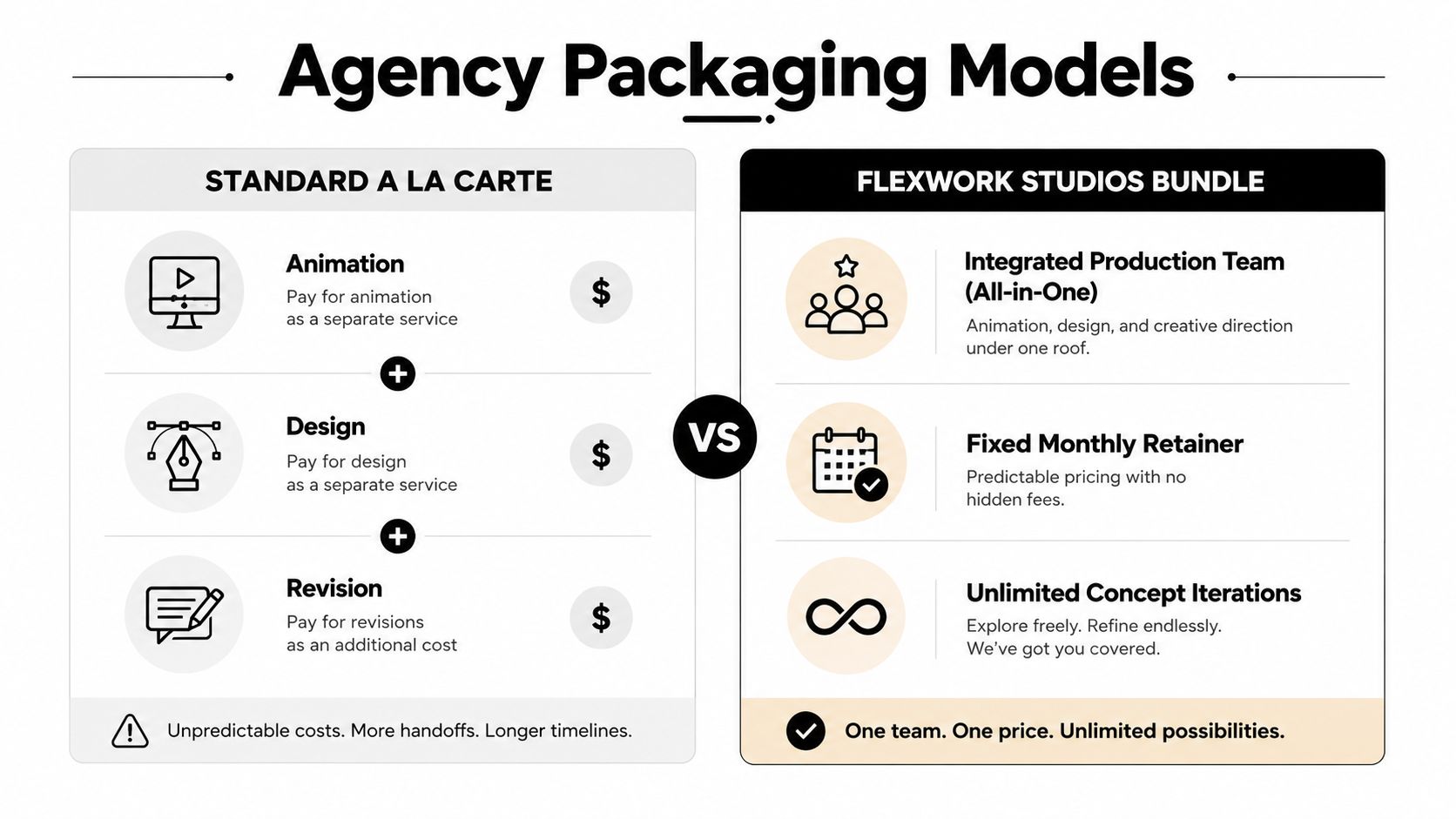
A bundled approach reduces the handoff problem. The producer who understands the episode can flag the best quote. The editor can build the cut around that quote. The motion designer can apply the correct typography and safe zones. The marketing team can publish the finished asset with a clear destination.
For companies comparing vendors, B2B podcast video agency services offer useful context on how video production and business content can fit together. The right partner should show exactly who owns scripting, editing, animation, approvals, publishing, and reporting.
The verified service details also state that podcast websites are $5,000 plus hosting. That can matter when motion graphics are part of a larger conversion path. A polished clip needs somewhere credible to send a prospect, guest, sponsor, or listener.
Budget principle: Pay for a repeatable visual system before paying for one spectacular animation.
Flexwork's custom studio asset service can support that system through show branding, reusable design elements, and assets that remain useful between production sprints. Flexwork Podcast Studios offers studio rental, recording support, editing, motion graphics, distribution, and marketing services in one production environment. Scope the deliverables before the shoot, especially the number of clips, formats, revision rounds, caption treatment, and source files.
Distributing and Measuring Motion Graphics That Perform
Distribution determines whether a motion graphic becomes a useful business asset or stays buried in a project folder. Publish the full video episode to YouTube and Spotify Video on release day, then stagger vertical clips throughout the first week so each asset has room to earn attention. Reuse the strongest hook later in a newsletter, a paid promotion, or a landing-page feature when it still reflects the episode's central idea.
The exact cadence should follow your production capacity. A reliable schedule beats a crowded launch followed by silence. Your design brief should account for the viewing environment from the start:
- Silent autoplay: Put the key idea in readable captions and on-screen framing, not only in the audio.
- Fast decisions: Make the opening visual establish the speaker, topic, or tension immediately.
- Platform behavior: Create separate versions for vertical and horizontal placements instead of relying on a single crop.
- Clear destination: Give the viewer one next step, such as watching the full episode, visiting a page, or joining an email list.
A university study on adapting podcast content for YouTube found that viewers focused more on the topic than the format, while pure subtitle animation and pure animation were judged more engaging than some mixed approaches. The NTNU study on podcast adaptation raises the question producers should ask before adding effects: does this movement help comprehension, or does it only signal that someone opened an animation preset?
Measure the path, not just the view
Track completion rate, saves, shares, profile visits, and click-throughs to the full episode or landing page. Use UTM-tagged links wherever the platform and destination support them, then compare formats by the action they generate. A clip with fewer views but stronger qualified visits may be more valuable than a broad clip that produces no meaningful next step.
Review performance after publication and record the creative variables:
- Hook type: question, claim, story, disagreement, or explanation.
- Visual treatment: captions only, waveform, lower third, quote card, or layered animation.
- Speaker framing: single speaker, split screen, or tracked reframing.
- Destination: full episode, newsletter, booking page, or sponsor page.
Independent research on motion illustration in radio broadcasts reported gains in attention, comprehension, and retention, but practical guidance on when motion graphics justify added podcast production cost remains limited. The UiTM research on motion illustration in radio supports testing the visual layer against real objectives rather than treating animation as automatically effective.
Ready to Make Your Show Look as Sharp as It Sounds
Podcast motion graphics aren't a luxury reserved for large media brands. They give a strong conversation a better chance to travel through visual-first platforms, help new viewers understand the subject quickly, and create a consistent identity across clips, episodes, and landing pages.
Three decisions make the largest difference:
- Design for distribution: Build the episode with vertical clips, captions, lower thirds, and platform-specific exports in mind.
- Protect comprehension: Use movement to identify, emphasize, and organize information. Don't bury the speaker under constant effects.
- Ship consistently: A reusable template system compounds because every new episode becomes easier to package and publish.
Flexwork can absorb the motion design layer alongside studio rental, filming, editing, branded templates, audiograms, social clips, podcast websites, and ongoing marketing support. That lets hosts spend more time preparing better questions and less time rebuilding exports, correcting captions, or chasing scattered freelancers. Creators who also need business setup and brand direction can explore brand and LLC formation support from Vyse Creative as part of a broader launch plan.
Book a Content Day when you need an efficient batch of polished assets. Choose the Market, Manage & Produce My Podcast package when you need a sustained production and growth workflow. Either way, ask for a clear scope covering deliverables, turnaround, revision process, platform formats, and reporting before the cameras roll.
Flexwork Podcast Studios offers acoustically treated studio rentals, video podcast production, editing, motion graphics, branded social clips, podcast websites, and growth-focused production packages for creators in the NJ/NY metro area. Visit Flexwork Podcast Studios to book a Content Day or request a Market & Manage consultation, then scope the motion graphics, formats, turnaround, and pricing your show needs.