Video Podcast Creation: A Complete Guide to Launch and Grow
 August 21, 202628 Minutes
Video podcast creation has moved from a niche experiment to a mainstream format. Edison Research found that 51% of the U.S. population age 12 and older has ever consumed a video podcast, 37% watched one in the last month, and 26% watched one in the last week in Podcast Consumer 2025 (Edison Research). The implication is straightforward: launching a show now means planning for cameras, clips, search, audio feeds, and platform-specific publishing from the first recording.
Flexwork Studios works with creators, entrepreneurs, and podcast teams that want that system without turning every episode into a technical project. This guide covers the decisions that shape a professional show, from format and equipment to production days, editing, distribution, and the point where a studio partner makes more sense than another weekend spent troubleshooting footage.
Why Video Podcast Creation Is Now the Default Playbook
A single recording can now serve as a full episode, an audio feed, vertical clips, search content, and promotional assets. That production model makes video podcast creation a distribution system, not a camera session.
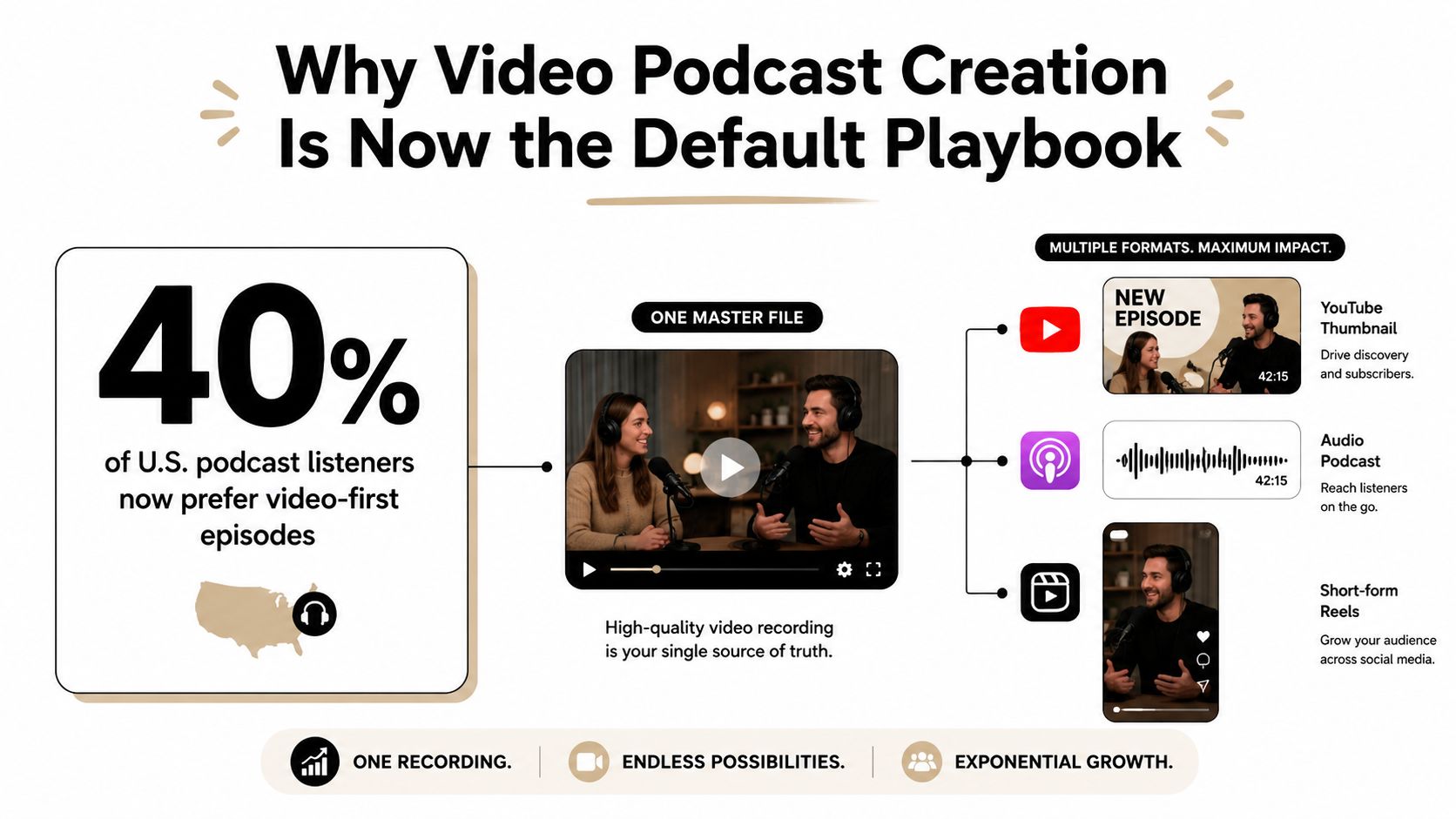
Spotify's platform data shows how quickly this model has spread. In June 2024, Spotify reported more than 250,000 video podcasts on its platform, up from 100,000 in 2023, and said more than 170 million users had watched a video podcast there (Spotify Newsroom). Visual quality and packaging now belong in the initial production decision beside audio quality.
Build the episode as a hub
The full-length recording is the hub. YouTube and Spotify Video can carry the visual episode, while an audio version serves people listening during commutes, workouts, or work. Short vertical clips create discovery opportunities on Instagram Reels, TikTok, LinkedIn, and YouTube Shorts.
A single conversation should produce several useful outputs:
- Long-form video: The complete discussion, with a clear thumbnail, title, chapters, and description.
- Audio distribution: A clean, listener-first version for podcast apps and RSS feeds.
- Short-form clips: Focused moments with strong openings, captions, reframing, and platform-native pacing.
- Search assets: A transcript, episode page, show notes, and chapter language that gives search engines context.
- Brand assets: Guest quotes, stills, behind-the-scenes footage, and promotional cutdowns.
Your video content marketing strategy must shape the recording plan before cameras roll. Otherwise, the editor may need to rescue vertical framing, find missing close-ups, rebuild weak hooks, or work around unusable background footage. Those fixes consume time and still may not produce publishable clips.
The DIY route works for a controlled solo show with a quiet room, stable camera, and repeatable lighting. Interviews and roundtables raise the production burden because every speaker needs reliable audio, usable angles, and reactions that support the edit. A studio-supported workflow earns its cost when setup, monitoring, coverage, and post-production would otherwise pull the host away from the show.
Producer's rule: Record one strong conversation, but never plan to publish only one file.
Video is not automatically right for every show. An intimate, audio-first format may work better as audio, and some listeners prefer not to watch. Preserve the audio experience, then use video to expand discovery, authority, and the ways an audience can encounter the show.
Picking Your Format, Show Structure, and Equipment Tier
The format sets the production workload before you buy a camera. A solo direct-to-camera show needs stable framing and consistent sound. A two-person interview adds reaction coverage and matching eyelines. A roundtable demands reliable microphones, usable angles for every speaker, and a moderator who can protect the pace.
Choose the audience relationship first. Solo shows reward directness and a repeatable cadence. Interviews depend on preparation, guest chemistry, and enough coverage to shape the conversation in post. Roundtables require clear seating, disciplined turn-taking, and stronger control of the room. A useful overview of podcasting genres and formats can help connect the subject matter to the right structure.
Choose an equipment tier that matches the edit
| Tier | Camera | Audio | Lighting | Best For |
|---|---|---|---|---|
| Tier 1 | Smartphone or entry camera, single angle | USB microphone | Ring light or compact LED | Solo commentary and simple founder updates |
| Tier 2 | DSLR or camcorder, two-camera setup | Shotgun microphones into a small interface | Softbox lighting | Interviews and polished two-person shows |
| Tier 3 | Cinema cameras, three or four angles | Multi-channel audio mixer | Dedicated studio lighting | Roundtables, branded series, and high-production shows |
These tiers are decision bands, not rules. Tier 1 limits cost and setup time, but one angle leaves little room to tighten pauses or hide edits. Tier 2 adds visual variety without requiring a full broadcast operation. Tier 3 provides stronger coverage and consistency, while creating demands for a suitable room, crew, storage, and post-production capable of handling multiple sources.
Use this test:
- Choose Tier 1 for a host-led show in a visually simple, quiet setting.
- Choose Tier 2 when guests drive the concept and the edit needs two perspectives.
- Choose Tier 3 when multiple guests, sponsors, demonstrations, or livestream elements make missing coverage expensive.
- Rent before buying while testing the format or recording irregularly.
- Use a studio when setup, teardown, monitoring, and room treatment would take energy away from the conversation.
The recording is only one input in a multi-platform production system. Decide whether each shoot must supply a full episode, clean audio, alternate angles, and moments that can support later edits. A format that looks affordable on paper may become expensive once every platform needs different framing and cutdowns.
A smartphone remains a practical camera or backup. Creators improving mobile recording can use this guide to studio-quality audio on a smartphone for setup context. Prioritize intelligible sound over a cinematic image. If viewers struggle to understand the host, better visuals will not rescue the episode.
DIY works well for a controlled solo show with repeatable lighting and a quiet room. Guest interviews justify studio support sooner because setup, monitoring, coverage, and resets can pull the host away from the conversation. Flexwork Podcast Studios becomes a practical option when those production tasks cost more time than the studio session, especially for a multi-camera format that must produce both a polished episode and usable platform cuts.
More gear will not repair an unfocused structure. Define the conversation, choose the required coverage, then buy or book only what the edit needs.
Pre-Production Essentials for a Camera-Ready Show
A few minutes of planning can prevent hours of repair. A guest without a briefing, a premise that changes mid-recording, or room noise beneath every answer creates problems across the entire production system, from the full episode to short clips and audio exports.
Set the episode plan during the week before the shoot. Define the central question, outline the conversation, and mark moments that need products, screens, demonstrations, or other visual support. Send each guest a concise brief with the topic, tone, approximate flow, wardrobe guidance, arrival details, and subjects to prepare or avoid. For scripted segments, this podcast script writing guide can help establish structure while preserving room for natural follow-up questions.
Make the set support the edit
Wardrobe affects more than appearance. Patterns can shimmer, reflective accessories can catch the key light, and clothing that matches the set can weaken separation between the speaker and background. Ask guests to bring a backup option when the show's visual identity matters to their brand.
Sound deserves the first serious check. Place microphones roughly 6 to 12 inches from each speaker, inspect the room for HVAC and fan noise, and check for clipping before the first take, using the practical workflow guidance from Podmuse. Rugs, curtains, soft furnishings, and hanging blankets can reduce reflections in a home room. Turn off noisy appliances, then listen for intermittent sounds that a brief equipment test might miss.
Room treatment gives the editor cleaner material. An untreated room can force a reshoot when a host moves, a guest speaks softly, or echo becomes noticeable. A turnkey studio reduces those variables through an acoustically prepared environment, pre-rigged equipment, and production support. Flexwork Podcast Studios fits when preparing the room, checking coverage, and protecting the recording schedule costs more time than the studio session.
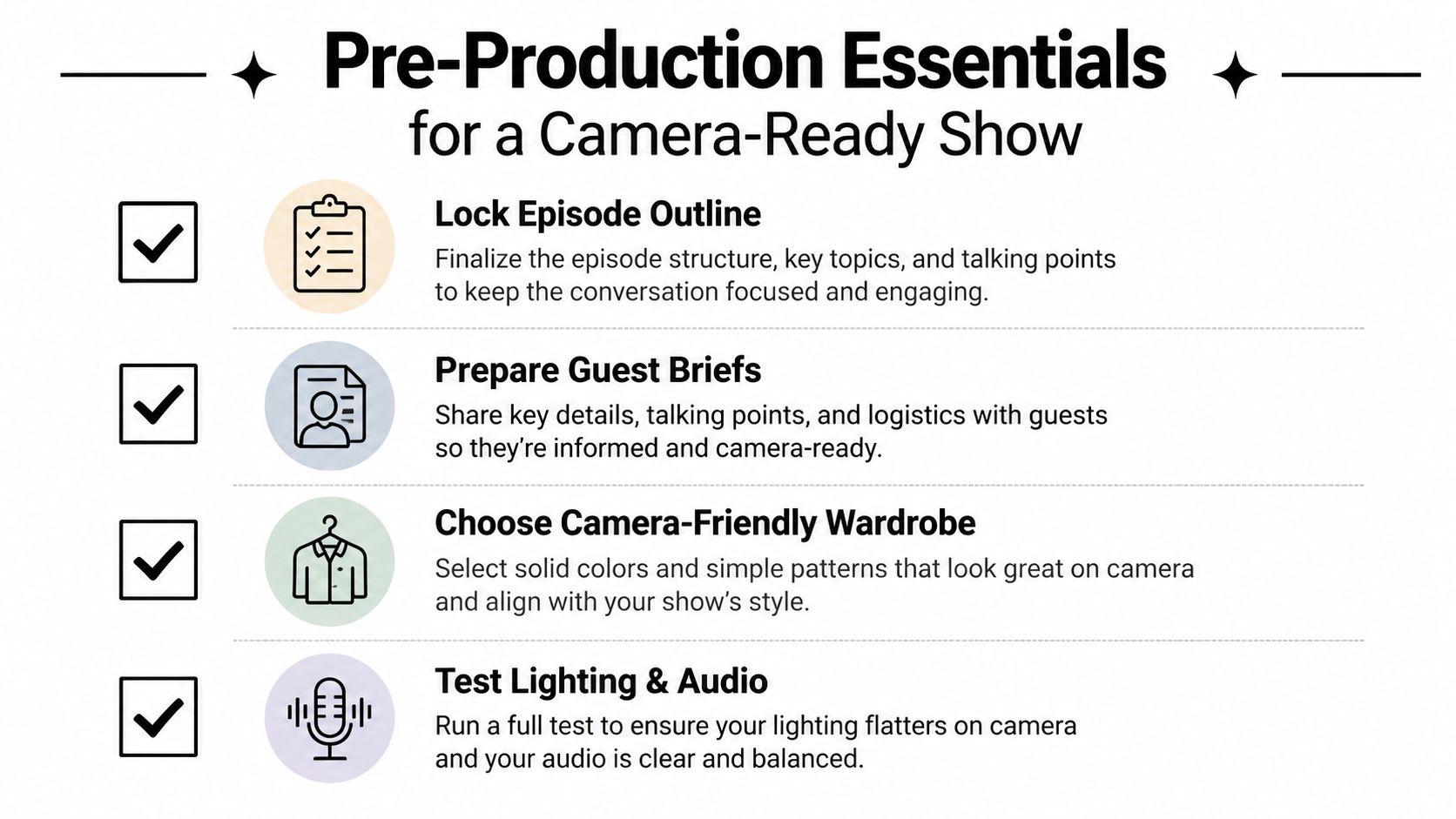
Use this decision check before anyone sits down:
- Lock the outline: Define the opening, key questions, transitions, and closing action.
- Prepare guest briefs: Share logistics, wardrobe guidance, talking points, and recording expectations.
- Test the microphones: Check placement, gain, room noise, clipping, and backup recording.
- Confirm framing: Use rule-of-thirds composition, check headroom, and give every speaker dedicated shot coverage.
- Balance color: Match daylight, warm lamps, and cool LEDs instead of mixing them accidentally.
- Control the room: Silence HVAC and fans, add soft surfaces, and listen from each speaker's position.
- Plan visual inserts: Identify products, screens, props, or B-roll that can break up conversation segments.
Preparation should guide the host, not dictate every sentence. Decide what the edit must deliver across platforms, then choose DIY setup or studio support according to the time and control each option requires.
Running a Real Recording Day From Setup to Wrap

A professional recording day runs on sequence, not improvisation. The host, guest, producer, and engineer should know the plan before talent sits down, so studio time goes toward usable footage rather than avoidable resets.
Start with a production meeting. Confirm the run-of-show, guest names and titles, pronunciation, sponsor language, segment order, and visual demonstrations. Then check lighting, audio levels, camera framing, and recording paths before anyone says the first line. Use the process flow chart for a professional video recording day to keep each handoff visible.
What happens before the first answer
The engineer watches waveform monitors for peaks and unwanted noise. A color chart or reference card gives the editor a reliable match point, while a framing test checks natural eyelines and confirms enough coverage for a clean multi-camera edit.
In-ear monitoring or talkback lets the producer flag time, technical problems, or missed segments without interrupting the exchange. That communication prevents resets and protects the guest's momentum.
Direction should match the format. A scripted host can record in sections and repeat lines for cleaner edits. A conversational interview needs steady momentum, with the producer marking strong moments and requesting a pickup only when clarity or continuity demands it.
Capture B-roll between segments while the set remains active. Film product handling, room details, host transitions, screen demonstrations, and quiet reaction shots. Record room tone after the conversation with everyone silent, giving the editor material to smooth cuts without artificial ambience.
Livestreams require a separate control checklist. Start the encoder, confirm the stream destination, assign chat moderation, prepare lower-third triggers, and record a local backup in case the stream drops. Viewers see a stable broadcast because the crew has handled likely failure points backstage.
At wrap, name files consistently, back them up to two drives, record slate notes, and confirm that every camera and audio source copied successfully. File discipline saves more time than decorative transitions.
Follow the unspoken rules of a recording day: arrive prepared, respect the run-of-show, and keep the room quiet during sound checks. DIY works when someone can own this choreography without sacrificing the schedule. Flexwork Podcast Studios offers video podcast recording with up to two microphones and 1080p recording per microphone. Raw files and dedicated sound and video engineering are available within the session structure, making studio support practical when setup, monitoring, and wrap tasks would otherwise consume the production day.
Post-Production Workflow That Turns Footage Into Episodes and Clips
A finished recording is only raw material. The post-production team must turn it into several usable formats without weakening the original conversation. Start by creating a project folder with separate locations for camera files, audio, graphics, transcripts, exports, and delivery notes. Verify every transfer before editing. A missing audio card or corrupted camera file can force a costly reshoot.
Build the master episode in three passes. First, sync the cameras and audio, then remove false starts, long pauses, repeated answers, and technical interruptions. Second, shape the conversation around its strongest ideas. Preserve natural reactions and useful disagreement instead of cutting every breath from the exchange. Third, refine the visual rhythm with deliberate angle changes, punch-ins, and supporting graphics. A cut should clarify attention or improve pace. Decorative movement rarely justifies the extra review time.
Make the master episode reliable before cutting short-form assets
Dialogue quality comes before visual polish. Repair obvious clicks and background noise, balance the speakers, and check the mix on headphones, laptop speakers, and a phone. Set a consistent loudness target for the audio feed and video master, then listen for music, sponsor beds, and stingers competing with speech. Music belongs beneath the conversation, not beside it.
Match exposure, white balance, and skin tones across camera angles before adding branded elements. After the base correction is stable, place lower thirds, sponsor graphics, logos, chapter cards, and on-screen references. Keep those elements inside platform-safe areas so they survive later crops.
Review the full episode once without stopping. Mark moments that contain a clear question, strong opinion, useful explanation, surprising answer, or emotional turn. Those markers become the source map for clips.
Build clips from editorial moments, not random timestamps
A vertical clip needs its own opening, context, and payoff. Cut the selected moment tightly, but retain enough setup for viewers unfamiliar with the episode to understand the point. Reframe to 9:16, keep faces and important demonstrations visible, and add captions manually checked for names, technical terms, and punctuation.
Use platform presets rather than exporting one vertical file for every channel. Prepare versions for TikTok, Instagram Reels, and YouTube Shorts, then review each crop before delivery. An AI podcast video generator tool can speed up moment selection, reframing, and caption creation. A producer still needs to verify context, pacing, brand tone, and factual accuracy.
| Deliverable | Production requirement | Review priority |
|---|---|---|
| Full video episode | Final picture, corrected color, mixed dialogue, graphics | Continuity and viewer retention |
| Audio episode | Clean dialogue, music balance, consistent loudness | Speech clarity on small speakers |
| Vertical clips | 9:16 crop, captions, strong opening, clear payoff | Framing and comprehension without context |
| Thumbnail stills | Readable subject, clear visual hierarchy | Recognition at small sizes |
| Caption files | Accurate names, terminology, and timing | Accessibility and search value |
| Supporting copy | Titles, descriptions, quotes, and timestamps | Accuracy and platform fit |
Export the master episode, audio file, clips, captions, thumbnails, and copy as one labeled delivery package. Include version numbers and a review document that records approved assets, required changes, and publication status. That system lets a studio team, marketing team, or client find the right file without reopening the edit.
DIY editing makes sense when the show has a predictable format, a limited clip count, and an owner with protected editing time. Studio support pays for itself when each episode needs multi-camera cleanup, audio repair, color matching, branded graphics, captioned vertical edits, and several review rounds. In that situation, the hourly savings come from removing repetitive technical work and preventing re-exports caused by avoidable mistakes.
Publishing, Distribution, and the Multi-Platform Repurposing Stack
Distribution starts with audience behavior, not a desire to appear everywhere. Put the complete visual episode where viewers expect long-form content, keep the audio version available for listeners, and use short clips to introduce the show to people who haven't committed to an episode yet.
A practical stack looks like this:
- Long-form video: Publish to YouTube and Spotify Video with distinct thumbnails, descriptions, chapters, and titles.
- Audio-first distribution: Maintain the RSS feed and publish the audio experience to Apple Podcasts and Spotify.
- Discovery clips: Adapt key moments for TikTok, Instagram Reels, LinkedIn, and YouTube Shorts.
- Owned search presence: Create an episode page with an embedded player, transcript, show notes, guest details, and relevant internal links.
- Operational scheduling: Use Buffer or Later to place clips, quotes, stills, and newsletter reminders across the release calendar.

Package the same conversation differently
A YouTube title can combine a searchable subject with a compelling outcome. A podcast title may need to be clearer and more consistent within a feed. A short clip needs an immediate opening because viewers decide quickly whether the moment deserves attention.
Test thumbnails at small size. If the subject, expression, and central idea aren't understandable within a quick glance, simplify the design. Keep text short, use a strong visual hierarchy, and make the image match the promise of the title.
Chapters help viewers jump to key sections in longer conversations and give search engines additional context. Write timestamps around meaningful questions or outcomes, not generic labels such as “conversation” or “intro.” Your episode page should support the same promise as the video, then give readers a reason to continue with another episode, resource, or service.
Automation can move files between platforms through tools such as Repurpose.io and Upload-Post, but automation doesn't replace review. Check captions, thumbnails, aspect ratios, tags, links, and publishing destinations before anything goes live.
Treat cadence as a business decision. A weekly schedule supports habitual viewing when the team can sustain it. A launch burst can make sense for a new product or series, while seasonal drops can align with a defined campaign. The key is consistency within the chosen model.
For a detailed method of turning one episode into a broader content library, use this podcast repurposing workflow. A thoughtful master content distribution system keeps the source conversation central while giving every channel a reason to exist.
Promotion Strategy and When a Studio Partnership Pays for Itself
Promotion starts before publication. Build a weekly system that assigns every asset to a specific moment: the release-day announcement, guest co-marketing, a mid-week clip, a newsletter mention, and a later reminder based on another insight. A video podcast is a production system across platforms, so promotion needs the same repeatable structure as recording and editing.
The workload rises quickly when one person records, edits, captions, writes copy, designs thumbnails, uploads files, manages guests, and handles distribution. The cost includes more than software and equipment. Gear depreciation, storage, missed deadlines, inconsistent output, and the opportunity cost of spending 12 or more hours each week editing can all limit growth. That figure comes from the production planning premise for this service, not a measured industry statistic. Use it as a personal audit threshold, not a universal benchmark.
Choose the support level by the bottleneck
| Package | Episodes / Month | Short-Form Clips per Episode | Editing Turnaround | Starting Price |
|---|---|---|---|---|
| Be My Podcast Producer | Defined by production plan | Defined by scope | Agreed per project | Custom quote |
| Market, Manage & Produce My Podcast | Growth-focused production plan | Defined by scope | Agreed per project | Starts at $1,500 per episode |
| Content Day | Batch recording session | 20 edited reels or 60 professional photos | Agreed per project | $3,000 per day |
| Podcast website | Episode publishing and owned media hub | Not applicable | Agreed per project | $5,000 plus hosting |
Flexwork's Market, Manage & Produce My Podcast tier starts at $1,500 per episode with a 20-episode growth commitment. A Content Day costs $3,000 per day and includes 20 edited reels or 60 professional photos. A podcast website costs $5,000 plus hosting. These options solve different constraints: recurring production capacity, batch content creation, or an owned publishing hub.
Choose studio support when production blocks the work only you can do:
- Cadence is slipping: Episodes remain unfinished because editing keeps moving down the calendar.
- Clip output is too low: You consistently produce fewer than four usable short-form pieces per episode.
- Production exceeds creation: File management and footage fixes take time away from ideas, interviews, sales, or client service.
- Quality varies by episode: Lighting, audio, framing, and delivery change with every setup.
- Your launch depends on one person: A vacation, client deadline, or technical failure stops the content pipeline.
DIY fits concept validation when you enjoy production and can protect the required time. Studio support fits a show with commercial goals, a demanding guest schedule, or a publishing commitment that requires repeatable execution. The right choice depends on the bottleneck, not on whether you can technically record at home.
Flexwork Podcast Studios provides studio rentals, production packages, Content Day sessions, editing, distribution, and podcast websites for creators building a dependable video podcast creation system. Visit Flexwork Podcast Studios to compare production paths and book a studio conversation.