
Master Your Video Production Workflow: A 2026 Guide
 May 28, 202621 Minutes
Meta title: Master Your Video Production Workflow
Meta description: Build a smarter video production workflow for podcasts and content days. Learn how to plan, record, edit, and publish with less chaos.
URL slug: /video-production-workflow
A lot of creators are stuck in an expensive middle ground. They've outgrown the laptop-on-a-desk phase, but they haven't built a real production system yet. So every shoot feels harder than it should. Files live in random folders. Audio needs rescue work. The edit drags because no one planned for clips, captions, or alternate formats before recording started.
That gap is where momentum dies.
A professional video production workflow fixes that. Not by making the process rigid, but by giving creative work a dependable structure. The strongest creators don't just record content. They run a system that turns one session into polished long-form episodes, clean short-form cuts, and repeatable publishing. If your brand depends on showing up on camera, that system matters as much as the camera itself.
For a lot of podcasters and founders, the primary advantage is pairing that structure with a space built for execution. That's where a studio environment starts to change the game, especially when the workflow supports both storytelling and scale. If your content still feels scattered, start with a stronger foundation in storytelling that actually holds attention.
The Pro Creator's Turning Point
The turning point usually doesn't look dramatic. It looks like a founder reviewing footage at midnight and realizing the room echo is worse than expected. It looks like a podcaster posting one strong episode, then disappearing for weeks because the edit queue got too heavy. It looks like a team with a smart message, a real audience, and no reliable way to turn recordings into publishable assets.
That's when creators stop asking, “How do I film this?” and start asking, “How do I run this every week without burning out?”
A working video production workflow answers that question. It creates order before the cameras roll, consistency during recording, and clarity after the shoot ends. The result isn't just cleaner content. It's confidence. You know what gets captured, where it goes, who touches it next, and how it turns into something worth publishing.
Your audience sees the final cut. Your brand feels every hidden flaw in the process that made it.
When creators make that shift, quality stops depending on luck. It starts depending on process.
The Anatomy of a Flawless Video Workflow
Most professional work still follows the same core structure: pre-production, production, post-production, and delivery. That model holds because it works. It gives teams a stable operating system for planning, recording, finishing, and publishing content, and professional projects commonly take 4 to 12 weeks from first planning to final delivery, with simpler training videos often landing in 2 to 4 weeks and more complex marketing campaigns stretching to 3 to 4 months according to this breakdown of production timelines and stages.

For podcasters, coaches, and founders, that might sound like filmmaking language. It isn't. It's the cleanest way to keep content from falling apart under deadlines.
Pre-production gives the project its shape
Pre-production is when work becomes smarter. During this stage, you define the episode angle, script or talking points, shot list, logistics, and publishing goals. If you need one shoot to produce a full episode, teaser clips, and a vertical reel package, that needs to be designed here, not guessed later.
A lot of creators skip this because they want speed. They usually get the opposite.
Production captures with purpose
Production is the recording phase. Cameras roll, audio gets captured, talent performs, and the team works through the plan. In weak workflows, production becomes improvisation. In strong workflows, it becomes execution.
That distinction matters when time is tight. If you're building a process for creators and marketing teams, it helps to think in terms of handoffs, approvals, and asset flow, much like teams do when managing content pipelines.
A sharper production setup also depends on using tools that fit the job. For creators comparing cameras, mics, editing platforms, and workflow apps, this guide to tools for content creators is a practical place to start.
To see how this looks in motion, this walkthrough is a useful visual reference:
Post-production shapes the final experience
Post-production takes raw material and turns it into a watchable product. Editing, color correction, audio mixing, graphics, and exports all live here. During this stage, the story gets refined and the brand polish becomes visible.
Distribution turns content into an asset
A lot of teams still treat delivery as the end. For modern creators, it's closer to a launch phase. Publishing, captioning, formatting for each platform, and tracking which assets go where all belong here.
Practical rule: If a video needs to perform on multiple platforms, distribution can't be an afterthought. It has to be designed into the workflow from day one.
Pre-Production The Secret to Stress-Free Recording
The easiest way to waste studio time is to arrive with a vague idea and hope the camera helps you find the rest. It won't. A camera records uncertainty just as clearly as confidence.
That's why pre-production deserves more respect than it gets. A well-structured workflow is separated into pre-production, production, and post-production because splitting planning, capture, and finishing reduces rework and makes scheduling, coordination, and asset management more predictable across multi-asset projects, as outlined in this overview of segmented production workflows.
What strong planning actually includes
Pre-production isn't just scriptwriting. For creator-led content, it usually includes:
- A clear content objective: Are you recording a flagship episode, a sales asset, a thought-leadership piece, or a batch of clips for social?
- A story path: Even unscripted conversations need an arc. Opening hook, key points, proof, and close.
- A clip strategy: Mark the moments that can become reels, shorts, or promo snippets before you shoot.
- A shot list: Wide, tight, side angle, product insert, host intro, guest reaction. If you want it, name it.
- A scheduling plan: Talent arrival, setup time, wardrobe notes, breaks, and any scene changes.
The more ambitious the content slate, the more valuable this stage becomes.
Why this stage protects your budget
Planning is what makes premium production efficient. It lowers indecision on set. It reduces pickup shots. It keeps the edit from turning into archaeology.
Here's a simple way to think about it:
| Pre-production habit | What it prevents |
|---|---|
| Approved run of show | Wandering interviews |
| Shot list for clips | Missing vertical moments |
| Asset checklist | Lost logos, lower thirds, and intro files |
| Talent prep notes | Flat delivery and avoidable retakes |
A lot of creators underestimate how much lighting choices also belong in this stage. Set design, skin tone, wardrobe, and mood all affect the plan long before record time. If you want cleaner visual decisions before shoot day, this guide on lighting for video recording is worth reviewing.
The smoothest recording days usually look uneventful. That's the sign that pre-production did its job.
From DIY Chaos to Polished Production
DIY setups can work for testing ideas. They're rarely built for consistency. That's the difference.
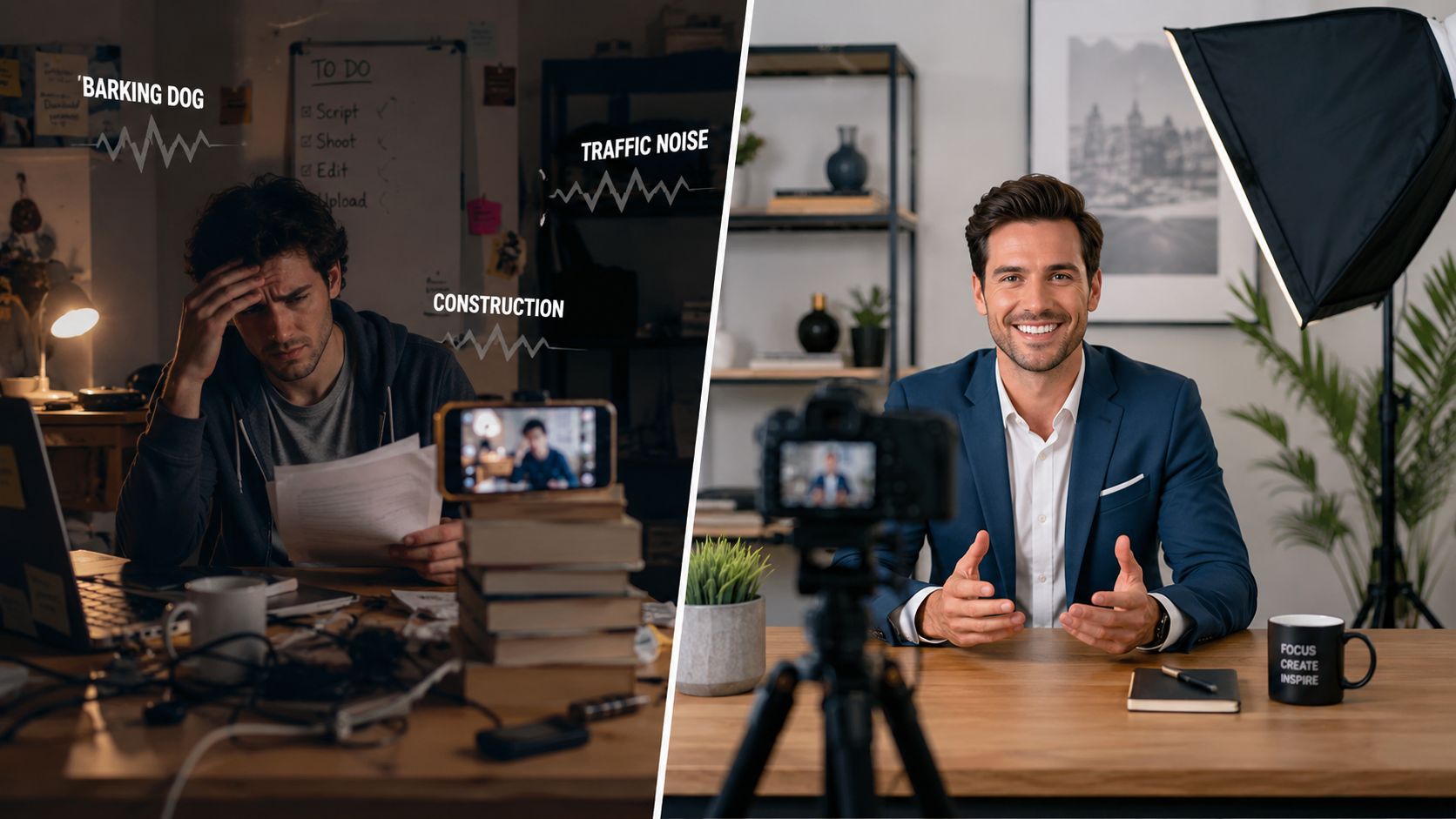
At home, the variables stack up fast. Street noise leaks into the mic. Light changes halfway through the session. The frame looks different every time you record. Your attention splits between hosting, engineering, monitoring batteries, checking focus, and wondering whether the air conditioner ruined the take.
What DIY gets wrong
The issue usually isn't effort. It's environment.
- Sound suffers first: Room echo and background noise instantly lower perceived quality.
- Visuals drift: Natural light and improvised framing create inconsistency across episodes.
- Shoots take longer: Every technical interruption breaks the talent's rhythm.
- Repurposing gets harder: If the footage wasn't captured with multiple formats in mind, short-form editing becomes compromise work.
Modern workflows need to support multi-output repurposing, not just a single finished video. That includes planning for captions, custom graphics, and turning one recording session into reels or shorts, a shift highlighted in this production guide on evolving video outputs.
What a studio changes
A studio gives you control. Controlled acoustics. Controlled lighting. Controlled camera placement. Controlled turnaround.
That's why a concentrated recording day often beats scattered DIY sessions. A Content Day at $3000/day gives creators a clear production window for capturing a high volume of assets in one focused session, including 20 edited reels or 60 pro photos. For brands that need more than one polished episode and want a bank of usable content, that format makes operational sense.
This side-by-side is how the trade-off usually looks:
| DIY recording | Studio production |
|---|---|
| You troubleshoot while performing | The setup supports performance |
| Inconsistent look across episodes | Repeatable visual identity |
| Audio fixes happen after the fact | Clean capture from the start |
| One piece of content at a time | One session can feed multiple outputs |
For creators weighing that decision, this comparison of studio versus DIY podcasting lays out what changes when the environment is built for production instead of convenience.
Your Post-Production System for Maximum Reach
Recording creates raw material. Post-production creates advantage.
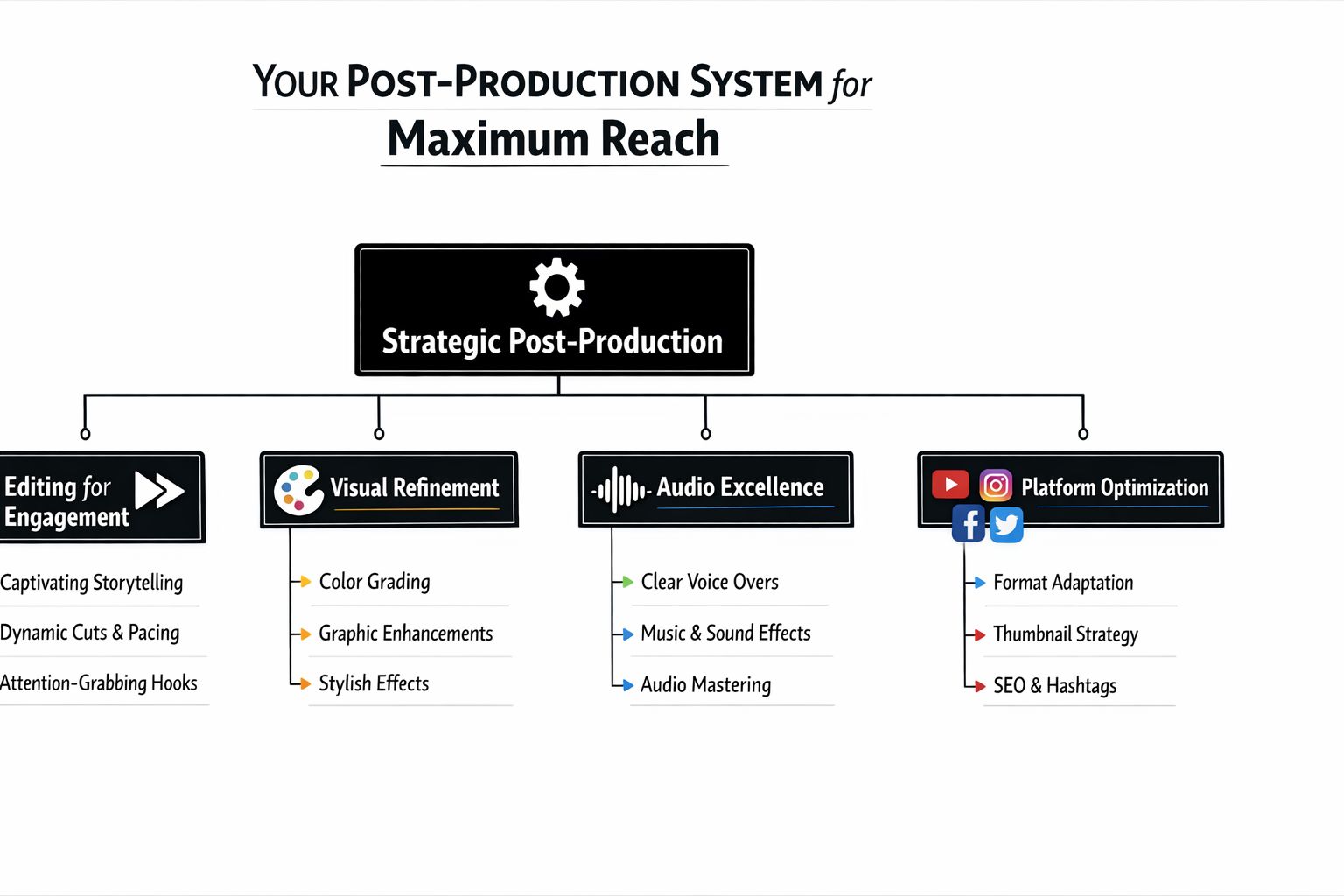
The strongest content teams don't stop at “edit the episode.” They build a post-production system that turns one session into a set of assets with distinct jobs. The full episode serves depth. The clips drive discovery. The graphics package sharpens brand recall. The captions make the content usable in silent-viewing environments.
The sequence that keeps edits efficient
Post-production works best in a defined order. An expert workflow moves from rough cut to fine cut to final cut, then into structured color correction and audio mixing. That sequence matters because it avoids wasted rendering and makes revisions cleaner, as described in this post-production workflow guide for editors.
In practice, that means:
- Rough cut to find the structure and remove obvious dead weight.
- Fine cut to tighten pacing, sharpen transitions, and refine timing.
- Final cut to lock picture before heavy polish begins.
- Color and sound after the structure is stable.
- Graphics, captions, and exports prepared for platforms.
If you grade too early or build detailed graphics before the story is locked, you create extra revision work for no good reason.
Lock the story first. Polish belongs on a stable timeline.
One recording, many assets
The point of divergence for modern content strategy from old-school editing becomes clear. A strong edit isn't just a finished episode. It's a content package.
A single recording can produce:
- A primary long-form asset: Full episode, interview, keynote, or teaching session.
- A short-form clip set: Hook-driven moments cut for vertical platforms.
- Branded support pieces: Intro, outro, lower thirds, quote cards, title graphics.
- Platform variants: Different crops, caption styles, and runtimes based on where the content will live.
That approach is also why software choices matter. If you're comparing platforms for editing, graphics, and finishing, this roundup of professional video tools is useful alongside this internal guide to video editing software.
For creators who don't want to build the post pipeline alone, Flexwork Podcast Studios offers production support that covers recording through editing, motion graphics, sound mixing, distribution, and marketing. On the higher-touch side, the Market, Manage & Produce My Podcast tier starts at $1500 per episode with a 20-episode growth commitment, which suits teams treating content like an ongoing business asset rather than a side project.
Managing Your Assets a Pro-Level Approach
Most workflows don't break in the creative phase. They break in the handoff.
A missing audio folder. A mislabeled export. A project file saved over the wrong version. Once your content volume grows, organization becomes production insurance. Without it, every new editor, producer, or remote collaborator inherits confusion.

The baseline system
You don't need an elaborate media operation to get this right. You need consistency.
- Standardize folders: Keep separate folders for raw video, raw audio, graphics, exports, project files, and transcripts.
- Name files like a team will use them: Show name, date, camera angle, version, and status beat vague labels every time.
- Track versions deliberately: V1, V2, and approved finals are useful. “final_final_new” is not.
- Back up before handoff: Don't wait until the end of the day if multiple people need the media.
- Archive with intent: Save the final master, project file, graphics package, and source assets in a way that someone else can retrieve later.
Build for remote reality
Remote and hybrid work adds another layer. Editors may not touch original camera files right away. Producers may need to review proxies. Audio sync and timeline reliability become more important when the team isn't sitting in one room.
Adobe's experts recommend maintaining an offline workflow and transcoding camera masters before editorial handoff to improve stability in collaborative environments, part of a broader view that resilient workflows need fail-safes for audio sync, version control, and delivery continuity in this Adobe panel discussion on post-production reliability.
A practical handoff checklist helps:
| Before editorial handoff | Why it matters |
|---|---|
| Confirm all media is present | Prevents missing-file delays |
| Transcode or prep edit-friendly files | Improves reliability |
| Include sync notes and project notes | Reduces guesswork |
| Mark approved assets clearly | Keeps editors off outdated material |
A resilient workflow isn't the most complicated one. It's the one that survives handoffs without drama.
Build Your Content Engine with Flexwork
A polished video production workflow does more than clean up your process. It changes how your brand shows up. Consistent visuals make you look established. Cleaner audio builds trust. Faster repurposing helps you publish without disappearing between launches.
That kind of system is what turns content into infrastructure.
If you're building a serious show or a founder-led media presence, there are a few different ways to approach it. Some creators only need studio access and a clean place to execute. Others need producer support, editing, motion graphics, and distribution baked into the process. Some need a broader content engine that connects the episode to clips, publishing, audience growth, and a dedicated website. Flexwork's service stack maps to those stages, from hourly rentals to production packages, Content Days at $3000/day, podcast websites at $5000 plus hosting, and the higher-touch marketing tier designed for long-term publishing.
When outside support makes sense
Professional support tends to make the biggest difference when any of these are true:
- You're losing time to technical fixes: Recording is draining energy you should be spending on message and delivery.
- You need repeatability: One good episode isn't the goal. A reliable publishing cadence is.
- Your content has multiple jobs: You need long-form authority, short-form reach, and clean brand presentation from the same shoot.
- Your team is hybrid or lean: Clear production systems matter more when fewer people are carrying more responsibility.
Creators exploring newer workflows can also learn from adjacent strategy conversations, especially around automation and distribution. This AI video marketing guide is useful background if you're thinking about how production systems connect to publishing at scale.
The shift is simple. Stop treating content like a series of isolated shoots. Build it like an engine.
If you're ready to turn scattered recording days into a real production system, explore Flexwork Podcast Studios and book a tour, compare packages, or start planning a studio session that fits the way you create.