
Master Your Video Production Timeline
 May 20, 202624 Minutes
Meta title: Master Your Video Production Timeline
Meta description: Build a smarter video production timeline that turns one studio session into podcasts, reels, shorts, and polished content.
URL slug: /video-production-timeline
Primary keyword: video production timeline
Secondary keywords: content creation timeline, podcast production workflow, short-form video strategy
A strong idea can still produce weak content if your process is loose.
You book a shoot, show up with a rough outline, record for a few hours, and assume the hard part is over. Then the arduous part begins. Footage sits untouched. Revisions multiply. Clips don't match your distribution plan. The final video exists, but it doesn't work as a system.
That's the difference between creating content and producing it professionally. A video production timeline isn't admin. It's the operating model that protects your creative vision from chaos. It tells you what gets decided before the camera rolls, what has to happen during the session, and what needs to be built after the shoot so your content performs across platforms.
If you're building a podcast, branded show, or creator-led media brand, this matters even more. One recording day should never lead to one lonely deliverable. It should fuel an entire release cycle. That shift from one-off output to content system design is where ambitious creators level up, especially when they start planning with the discipline behind a real video content marketing strategy.
From Creative Spark to Calculated Success
The most expensive production mistake usually doesn't happen on set. It happens earlier, when a creator mistakes momentum for preparation.
A founder decides to launch a video podcast. The concept is strong. The guest list is promising. The studio day gets booked. But nobody locked the episode objective, mapped the short-form cutdowns, or decided which moments need a clean hook for reels. By the end of the session, the team has footage, but not direction.
That's how good shoots turn into average campaigns.
Why pros treat timelines like creative infrastructure
Professionals don't use a video production timeline because they love process. They use it because process protects quality. It keeps the brand message consistent, the shoot focused, and the edit useful long after the cameras stop rolling.
A timeline gives creative work a sequence. Without that sequence, you don't have a production. You have a pile of footage.
The right timeline also creates freedom. Once decisions are made in the right order, you stop wasting energy on preventable questions. Your team knows what to capture, what to prioritize in post, and which assets matter most for launch week.
What changes when you plan like a studio
You stop treating filming as the whole project. You start treating it as one moment inside a broader system.
That shift changes everything:
- Your pre-production gets sharper because the message, format, and deliverables are defined early.
- Your studio day gets more efficient because each segment is captured with final usage in mind.
- Your post-production gets cleaner because editors aren't guessing what success looks like.
Ambitious creators don't need more content. They need a structure that turns one strong idea into polished, repeatable output.
The Three Phases of Professional Video Production
A studio day should produce more than one finished video. It should generate a long-form anchor asset, a bank of short clips, platform-specific versions, and clear material for the next few weeks of publishing. That only happens when your video production timeline treats the shoot as one phase inside a larger system.
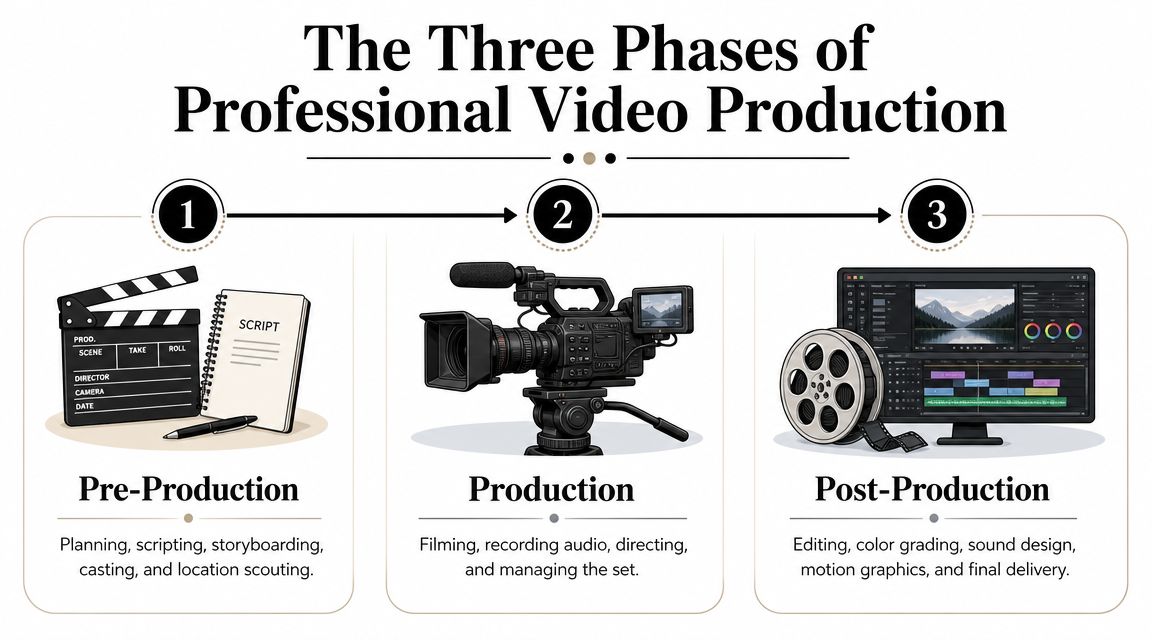
A professional process runs through three phases: pre-production, production, and post-production. Each phase has a different job. Confuse those jobs, and you waste the booking, slow down approvals, and leave repurposing opportunities on the table.
The Blueprint
Pre-production decides whether the project will scale after the cameras stop.
At this stage, define the audience, message, distribution plan, episode structure, shot list, talent prep, and approval path. For modern creators, it also means choosing the derivative assets before the session begins. If you want three reels, a teaser, a YouTube cut, and paid social variations, plan for them here. Do not ask an editor to invent that strategy from raw footage later.
Strong workflow planning keeps creative work from turning into revision debt. Moonb's workflow insights make the same point from an operations angle: the handoff between idea, execution, and review determines how fast quality work ships.
One missed pre-production decision can ripple through the entire timeline. A vague brief creates weak takes. Weak takes create bloated edits. Bloated edits create longer review cycles.
The Performance
Production is execution under pressure.
Your team is capturing the core conversation, alternate takes, b-roll, pickup lines, stills, and platform-specific framing while the clock is running. That workload is why professional shoots feel disciplined. Every setup should serve a defined output, whether that is a polished hero video, a vertical hook for Reels, or a clean intro segment for YouTube.
Use the shoot to confirm decisions already made. Keep enough flexibility for a strong spontaneous moment, but do not build the concept on set. That approach burns time and usually leaves you with footage that works for one edit and nothing else.
A useful benchmark from Think Branded Media's production timeline breakdown is that filming takes a relatively small share of the total timeline compared with the planning and post-production wrapped around it. That matches real studio economics. One booked session can create a month of content, but only if capture is organized for multi-asset delivery.
A quick visual walkthrough helps make that distribution easier to grasp:
The Polish
Post-production turns raw footage into an asset library you can publish.
Editing shapes the long-form story first. Then the team cuts trailers, short-form clips, alternate aspect ratios, captions, graphics, sound cleanup, and color correction. After that, reviews and revisions decide whether the content goes out on time or stalls in feedback loops.
This phase carries more strategic weight than many creators admit. Post is where you protect pacing, sharpen authority, and make one recording session useful across multiple channels. If your team is still choosing tools reactively, fix that early. A clear understanding of video editing software for long-form and short-form production helps you match the workflow to the output instead of forcing editors to patch together an inefficient process.
The pattern is simple. Pre-production sets the commercial value. Production captures it. Post-production multiplies it.
Building Your Modern Content Creation Timeline
Old-school timeline advice usually assumes you're making one finished video. That's not how creators operate now.
You're likely recording one podcast episode, then pulling reels, vertical shorts, teaser clips, quote graphics, and promo assets from the same session. That means your content creation timeline can't end at “final video delivered.” It has to account for how one shoot becomes a repeatable publishing system.
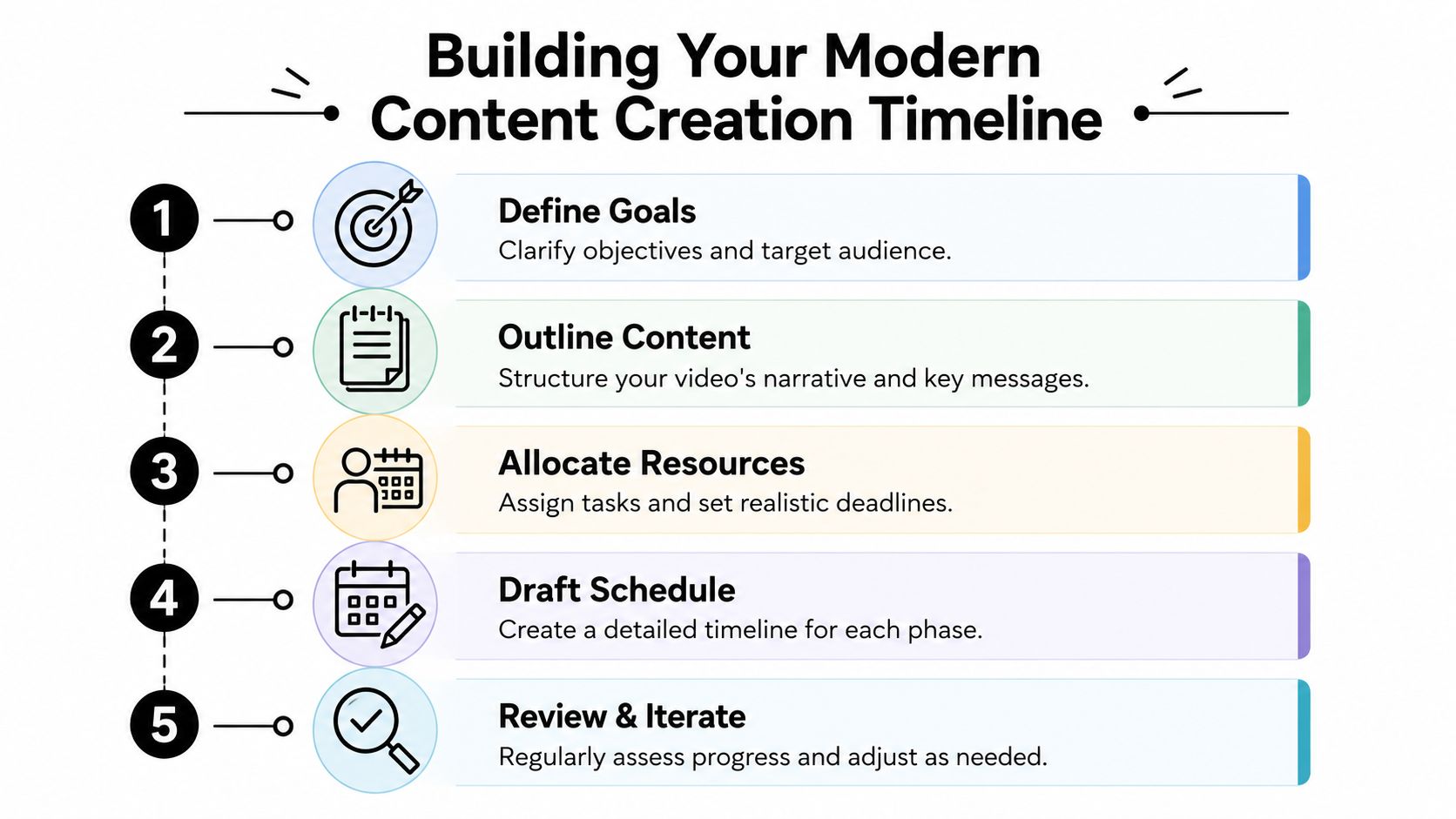
A useful industry observation is that most guides still focus on single-video projects, while modern teams need to plan for multiple assets from one shoot. The key opportunity is to structure post-production so one long-form session becomes an efficient content system, as noted in Lemonlight's video production overview.
Start with outputs, not filming
Most timeline failures begin with a backward question. Creators ask, “When can we shoot?” before they ask, “What exactly needs to come out of this session?”
Flip it.
Before you lock a date, answer these:
Core deliverable
Is this session producing a full podcast episode, a branded interview, a training video, or a campaign centerpiece?Derivative assets
Which cutdowns matter most after the main release? Reels, trailers, social clips, thumbnails, audiograms, quote cards, and teaser edits all require planning.Platform intent
A YouTube episode, Instagram Reel, LinkedIn clip, and homepage brand video don't want the same framing, pacing, or hook.Approval owner
Who signs off on messaging, rough cuts, captions, and final exports? If that's fuzzy, the timeline will drift.
Build the session like a content day
The smartest creators don't book studio time for a single upload. They batch.
That means organizing the day around a hierarchy of capture priorities. Record the flagship asset first. Then capture intros, outros, sponsor reads, alternate hooks, stills, and short-form moments while the set, energy, and wardrobe are already working for you.
If you want a practical model for that approach, a dedicated Content Day for podcasters is built around exactly this kind of multi-asset workflow.
Treat your shoot like inventory creation. Every minute in studio should feed more than one publishing moment.
Use a planning checklist that editors can actually follow
A modern video production timeline should answer operational questions, not just creative ones. Borrowing from broader process thinking, teams that document dependencies and handoffs clearly tend to move faster. That's one reason I like Moonb's workflow insights. They reinforce a simple truth: creative speed comes from decision clarity.
Use this checklist before recording:
Message lock
Finalize the episode angle or brand message before anyone touches a camera.Asset map
List every deliverable expected from the session. Not “some clips.” Actual assets.Shot list and moments list
Plan hero shots, b-roll, cutaway reactions, and any segment that's designed for short-form extraction.File naming and folder structure
Decide how footage, audio, graphics, and selects will be organized before capture starts.Edit priorities
Choose the order of post-production. Main episode first, launch trailer second, short-form cutdowns after, for example.Revision boundaries
Set clear feedback windows and define who consolidates notes.
Put your timeline where everyone can use it
A beautiful schedule hidden in one person's laptop won't save the project.
The timeline should be visible to the host, producer, editor, designer, and marketer. If each person sees only their task and not the sequence, bottlenecks are guaranteed. The entire point is shared rhythm. That's what turns one booking into a real content engine instead of a frantic scramble after the shoot.
Sample Timelines for Ambitious Creators
You book a studio for one day. If your plan only covers one finished video, you are wasting the session.
Ambitious creators win by treating a production timeline as an asset plan, not a calendar exercise. One recording block should feed a flagship episode, short-form clips, launch assets, alternate edits, and a publishing queue. That is how you turn one booking into months of usable content instead of one polished upload followed by another scramble.
Sample Video Production Timelines
| Project Type | Total Duration | Pre-Production | Production | Post-Production |
|---|---|---|---|---|
| The Weekly Podcast Episode | Fast turnaround across days or a few weeks | Topic lock, guest prep, run of show, clip targets, asset checklist | One studio session for the full episode, cold open variations, sponsor reads, and social hooks | Edit main episode, pull shorts, add captions, review, export by platform |
| The High-Impact Brand Collaboration | Deliberate pacing across several weeks | Creative brief, script approval, stakeholder sign-off, shot planning, usage requirements | One focused production day with brand setups, alternates, stills, and pickup lines | Hero edit, cutdowns for paid and organic use, graphics, revisions, final delivery |
| The Quarterly Content Batch | Planned as a multi-asset system | Content calendar, episode themes, wardrobe planning, shot list by asset type | One or more batched studio days for multiple episodes, promos, intros, and reels | Staggered editing, trailers, short-form library, scheduling, archive management |
Which timeline fits your business model
The weekly podcast model fits creators who publish often and make decisions fast. The goal is speed with output volume. Go into the session knowing which moments need to become shorts, which quote deserves a reel, and which segment can anchor the full episode. If you wait until editing to figure that out, you lose time and leave usable content on the table.
The brand collaboration model needs tighter control earlier. Sponsored content, executive interviews, and campaign assets attract more opinions, more approvals, and more revision risk. Lock the concept before shoot day. Then capture enough variations in the studio to satisfy the brand team without forcing a reshoot.
The quarterly batch model gives the highest return for founders, agencies, and in-house teams with packed calendars. It works because it concentrates decision-making upfront, then spreads distribution over time. If your team needs a better system for planning a high-output session, use this guide on how to maximize studio time for content teams.
The right timeline matches your publishing rhythm, review process, and output goals. It should also raise the return on every studio day.
Milestones that matter more than dates
Calendar deadlines matter. Asset readiness matters more.
Strong timelines are built around decision points that keep the content pipeline clean:
- Outline or script approval so the message is settled before cameras roll
- Studio run-of-show with segment order, pickup priorities, and short-form opportunities
- Rough cut review focused on structure, pacing, and missing moments
- Platform delivery package with exports labeled by format, channel, and publish order
These milestones protect the primary objective. You are not just finishing a video. You are building a repeatable system that gets more value from every recording session.
Navigating Common Production Bottlenecks
Most delays don't come from talent or gear. They come from sloppy decision-making.
When a video production timeline stalls, the same few issues usually show up. They're predictable, and that's good news, because predictable problems can be prevented.
Endless feedback loops
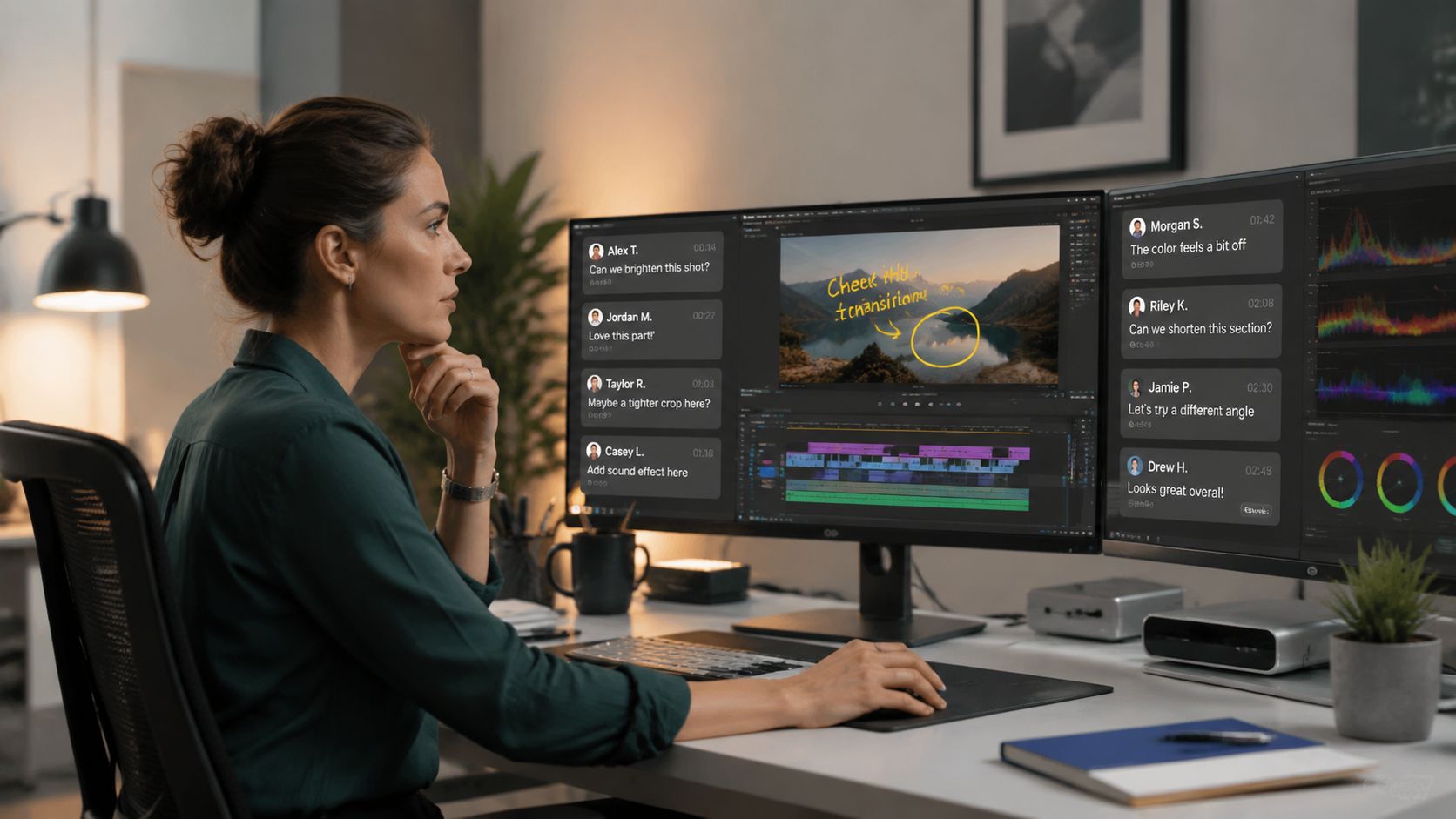
This one kills momentum fast. Five people leave separate comments. Two of them contradict each other. Nobody knows whose note is final, so the editor keeps revising without progress.
The root cause is almost always the same. No single decision-maker was assigned before post-production started.
Pro tip: Choose one note owner. Everyone else can contribute, but one person consolidates feedback into a single round of direction.
Disorganized asset management
Teams lose time when files are scattered across drives, text threads, email chains, and vague folder names. The damage isn't dramatic. It's cumulative. Editors search. Producers re-send. Designers use the wrong version.
Use a simple operating rule:
- Name files clearly with project, date, and version
- Separate raw, selects, graphics, audio, and exports
- Keep reference docs in the same project hub
- Store brand elements once, not in five duplicate folders
If your footage quality is strong but your production still feels harder than it should, your organization is probably the issue, not your cameras or your video lighting setup.
Scope creep disguised as creativity
A late request for “just one more teaser” sounds harmless. Then someone asks for alternate intros, new captions, a different thumbnail direction, and extra pull quotes. Suddenly the post schedule is doing work that nobody planned for.
That doesn't mean you should reject new ideas. It means you should decide when a new idea belongs in the current timeline and when it belongs in the next production cycle.
Good producers protect the schedule by separating approved scope from new opportunity.
Creators who master this get more output, not less. They no longer pretend every new thought deserves immediate execution.
Accelerate Your Timeline at Flexwork Studios
If your timeline keeps breaking, the issue usually isn't ambition. It's that you're trying to run a professional content operation with a DIY workflow.
That's where structured support matters. Flexwork Podcast Studios offers turnkey studio rentals, production support, and post-production services for creators who need polished podcast and video output without piecing together freelancers, gear, and logistics on their own.
Here's the blunt recommendation. If you want cleaner execution, choose the service level that matches your real workload.
For creators who want production help
If you don't want to manage the moving parts yourself, producer-led packages make the timeline easier because planning, recording, and finishing live under one roof. The “Market, Manage & Produce My Podcast” package starts at $1500 per episode with a 20-episode growth commitment. That structure fits teams that care about consistency, audience development, and operational discipline.
Podcast websites are also part of the bigger timeline, not an afterthought. A dedicated site is $5000 plus hosting, which makes sense when you're turning a show into a real brand asset instead of leaving episodes scattered across platforms.
For creators who want to batch content intelligently
The most impactful action for many podcasters is the Content Day model.
A Content Day is $3000 per day and includes 20 edited reels or 60 pro photos. That's not just a production package. It's a timeline decision. You batch capture, extract multiple assets from one session, and create a release runway instead of starting from zero every week.
Stop booking shoots with no downstream plan
Your camera day should create a pipeline. Your edits should support distribution. Your website, social clips, and long-form episodes should feel like parts of the same brand system.
That's what a mature video production timeline does. It turns creative energy into dependable output.
If you're ready to build a cleaner content system, book a tour or start a conversation with Flexwork Podcast Studios.